<?xml version="1.0" encoding="utf-8"?><feed xmlns="http://www.w3.org/2005/Atom" ><generator uri="https://jekyllrb.com/" version="4.4.1">Jekyll</generator><link href="https://freddysblog.com/feed.xml" rel="self" type="application/atom+xml" /><link href="https://freddysblog.com/" rel="alternate" type="text/html" /><updated>2026-07-22T03:35:13+02:00</updated><id>https://freddysblog.com/feed.xml</id><title type="html">Freddys blog</title><subtitle>Learn something new… – then Teach someone!</subtitle><author><name>Freddy Kristiansen</name></author><entry><title type="html">AL-Go for GitHub Enterprise</title><link href="https://freddysblog.com/2026/07/16/al-go-for-github-enterprise/" rel="alternate" type="text/html" title="AL-Go for GitHub Enterprise" /><published>2026-07-16T08:58:50+02:00</published><updated>2026-07-16T08:58:50+02:00</updated><id>https://freddysblog.com/2026/07/16/al-go-for-github-enterprise</id><content type="html" xml:base="https://freddysblog.com/2026/07/16/al-go-for-github-enterprise/"><![CDATA[<p>GitHub.com is the standard multi-tenant public platform where anyone can host personal or org repos, public or private. GHE.com refers specifically to GitHub Enterprise Cloud with data residency — a separate product tier where your enterprise gets its own dedicated subdomain (e.g., octocorp.ghe.com) instead of living on github.com/octocorp.</p>

<h2 id="the-challenge">The Challenge</h2>

<p>At this time, AL-Go for GitHub doesn’t work on GHE.COM enterprises, but there might be a solution for this ahead. I was contacted by Fellowmind in Sweden, who wanted to have this functionality and I guess there is likely nobody better qualified (outside Microsoft) to build this, than me, so… I accepted the challenge and I am working with <a href="https://www.linkedin.com/in/niklas-silvergrund-243445">Niklas Silvergrund</a> from Fellowmind to test the solution.</p>

<p>If you want to try this out yourself, there is a version of AL-Go in my Freddy-DK organization, which supports GHE.COM. Documentation on how to get started is here: <a href="https://github.com/Freddy-DK/AL-Go/blob/main/Scenarios/UsingGitHubEnterprise.md">https://github.com/Freddy-DK/AL-Go/blob/main/Scenarios/UsingGitHubEnterprise.md</a></p>

<p>I will keep this repo up-to-date with Microsofts AL-Go for GitHub and work with Microsoft to get support for GHE.COM into the main product, but I can obviously not promise any date.</p>

<p>Try it out, and report any problems by creating an issue in my fork, and I will make sure to fix them, before the functionality is merged.</p>

<h2 id="main-differences-between-githubcom-and-ghecom">Main differences between github.com and GHE.COM</h2>

<p><strong>Isolation &amp; access</strong>: On GHE.com, managed user accounts can only access resources within your enterprise’s dedicated instance – no interacting with the broader github.com ecosystem (no personal accounts, no public open-source repos mixed in). GitHub.com is fully open and interconnected.</p>

<p><strong>Data residency</strong>: GHE.com lets you choose the geographic region where your code and data are stored, which is the main compliance driver for adopting it. GitHub.com doesn’t offer this control – your data lives wherever GitHub’s standard infrastructure puts it.</p>

<p><strong>API endpoints</strong>: Integrations must hit your enterprise-specific URL (e.g., api.octocorp.ghe.com) rather than the standard api.github.com.</p>

<p><strong>Identity</strong>: GHE.com uses managed user accounts tied to your enterprise’s identity provider, separating enterprise work cleanly from any open-source/personal GitHub activity.</p>

<p><strong>Purpose</strong>: GitHub.com is the general-purpose platform for individuals and organizations of any size. GHE.com exists for enterprises with strict data residency or compliance requirements who still want a cloud-hosted (not self-managed) solution – as opposed to GitHub Enterprise Server, which is the fully self-hosted on-prem option.</p>

<h2 id="changes-needed-in-bccontainerhelper">Changes needed in BcContainerHelper</h2>

<p>BcContainerHelper is used by AL-Go for GitHub for handling GitHub packages (NuGet), and this functionality needed some changes due to the GitHub packages NuGet feed URL is different – **https://nuget.<enterprisename>.ghe.com/<organizationname>** vs. **https://nuget.github.com/<organizationname>** also the GitHub API URL is different, so this is deducted from the NuGet Server Url.</organizationname></organizationname></enterprisename></p>

<p>The PR can be found here: <a href="https://github.com/microsoft/navcontainerhelper/pull/4167">https://github.com/microsoft/navcontainerhelper/pull/4167</a></p>

<h2 id="changes-needed-in-al-go-for-github">Changes needed in AL-Go for GitHub</h2>

<p>Most changes come from the fact that the URL is different, **https://<enterprisename>.ghe.com/<organizationname>** vs. **https://github.com/<organizationname>**. This also changes the API URL by adding api in front of the hostname.</organizationname></organizationname></enterprisename></p>

<p>Inside GitHub workflows, we can use environment variables like GITHUB_SERVER_URL and GITHUB_API_URL, which takes care of most of these things.</p>

<p>A bigger challenge is that the GITHUB_TOKEN in workflows on GHE cannot be used for authenticating towards github.com – not even for public repositories and since AL-Go for GitHub still lives on github.com and every enterprise shouldn’t have to have their own version of AL-Go, this poses a few challenges when running Update AL-Go System Files.</p>

<p>Another problem is that you cannot use a template from github.com on ghe.com, so how do I create my repo with <a href="https://aka.ms/algopte">https://aka.ms/algopte</a> – if I cannot select my enterprise. The solution here is to create an indirect AL-Go template in your enterprise and keep that up-to-date (I have created a small tool for that) and then your “normal” repositories will use a PTE or AppSource template from your own enterprise and everything is normal.</p>

<p>Beside this, a few other fixes for github.com hardcoded stuff has been fixed, but everything should be working now…</p>

<p>The PR can be found here: <a href="https://github.com/microsoft/AL-Go/pull/2309">https://github.com/microsoft/AL-Go/pull/2309</a></p>

<h2 id="sources">Sources</h2>

<ul>
  <li><a href="https://docs.github.com/en/enterprise-cloud@latest/admin/data-residency/about-github-enterprise-cloud-with-data-residency">About GitHub Enterprise Cloud with data residency</a></li>
  <li><a href="https://docs.github.com/en/enterprise-cloud@latest/admin/data-residency/network-details-for-ghecom">Network details for GHE.com</a></li>
  <li><a href="https://docs.github.com/en/enterprise-cloud@latest/admin/overview/about-github-enterprise-cloud">About GitHub Enterprise Cloud</a></li>
</ul>

<p>Enjoy</p>

<p><strong><em>/Freddy</em></strong></p>]]></content><author><name>Freddy Kristiansen</name></author><category term="Uncategorized" /><category term="AL-Go for GitHub" /><category term="data-residency" /><category term="ghe-com" /><category term="GitHub" /><category term="github-enterprise" /><summary type="html"><![CDATA[GitHub.com is the standard multi-tenant public platform where anyone can host personal or org repos, public or private. GHE.com refers specifically to GitHub Enterprise Cloud with data residency — a separate product tier where your enterprise gets its own dedicated subdomain (e.g., octocorp.ghe.com) instead of living on github.com/octocorp.]]></summary></entry><entry><title type="html">What a year it has been!</title><link href="https://freddysblog.com/2026/07/09/what-a-year-it-has-been/" rel="alternate" type="text/html" title="What a year it has been!" /><published>2026-07-09T15:40:29+02:00</published><updated>2026-07-09T15:40:29+02:00</updated><id>https://freddysblog.com/2026/07/09/what-a-year-it-has-been</id><content type="html" xml:base="https://freddysblog.com/2026/07/09/what-a-year-it-has-been/"><![CDATA[<p>Roughly one year ago, my “lifetime” employment with Microsoft came to an abrupt end after 23 years of service – and what a year it has been…</p>

<p>After publishing my layoff announcement on <a href="https://www.linkedin.com/posts/freddykristiansen_all-good-things-come-to-an-end-after-23-activity-7330470998133174277-4pdt?utm_source=share&amp;utm_medium=member_desktop&amp;rcm=ACoAAAA7DKgBzUoL45Y-yjBIWSENlLBIUn58y2s">LinkedIn</a>, which had approximately <strong>1.1 mio</strong> views, <strong>7200+</strong> likes and <strong>550+</strong> comments, I decided that my biggest asset was probably my name and reputation. So I created my own company, Freddy.DK ApS, with the goal to stay active in the Business Central community as long as it is rewarding and fun.</p>

<p>And… it has definitely been both rewarding and fun… it is impossible to describe in a few words what I have done, but I will try to list some of the highlights.</p>

<h2 id="recharging-in-greenland">Recharging in Greenland</h2>

<p>While I truly see my layoff from Microsoft as a gift, it obviously also adds some tension about what’s next. My recommendation to anybody who experience things like this is to pull the plug and recharge, whether you are experiencing Greenland, walking the Camino or doing other adventures is not important, but doing something to clear your mind is truly worth it.</p>

<p><img src="/assets/images/2026/what-a-year-it-has-been/2025-07-18-13.28.24.jpg" alt="" /></p>

<h2 id="directions-for-partners">Directions for partners</h2>

<p>Torben Kragelund (CEO in the Directions for Partners org) called me before I even announced the layoff and asked me whether I would consider coming and working for the Directions team. The Directions conferences and the Days Of Knowledge events has always been dear to my heart, so I didn’t hesitate in accepting.</p>

<p>And… it has been an amazing journey. From being “on the other side”, to being part of the team has been truly rewarding and you suddenly realize the amount of work needed to pull off conferences like Directions EMEA. I do think that the Directions conferences and the Days of Knowledge events are more important than ever and we need to ensure that we keep evolving these events for partners throughout the world to ensure that the community stays strong and relevant.</p>

<p>I truly believe that every Business Central professional should visit at least one of these events, being Directions, Days Of Knowledge or BC Days – the payback is instant.</p>

<h2 id="microsoft-mvp">Microsoft MVP</h2>

<p>From Least Valuable Employee to Most Valuable Professional in less than a year:-)</p>

<p>Having worked with all the Business Central MVPs for a decade, I’ve grown to truly value and respect this group of people. Becoming an MVP and joining the group was a huge milestone for me and I will try to honor this badge to be eligible to many renewals.</p>

<p>BTW – before actually becoming an MVP, I received my MVP of the MVPs award from the Microsoft MVPs. That award is dear to my heart, THANKS!</p>

<h2 id="al-go-for-github">AL-Go for GitHub</h2>

<p><img src="/assets/images/2026/what-a-year-it-has-been/image-1.png" alt="" /></p>

<p>During my last years at Microsoft, I created a product called AL-Go for GitHub and as you might know, this product has now grown to become a central part of app development in Microsoft and with many partners.</p>

<p>While AL-Go for GitHub is plug-and-play, there are still a million settings and ways to setup AL-Go to match your needs. One of my first customers was Bunker Holding Group, who had a very large and impressive setup on Azure DevOps and wanted to move to AL-Go for GitHub. While this sounded easy, it came with a lot demands, requests and new ideas, which wasn’t part of AL-Go.</p>

<p>One of their problems was that their IT department didn’t want people to have admin rights, nor did they want to have people running Docker. This lead to the development of Fkh – Freddy’s Kubernetes Helper, which basically ensures bunker that they are ready when Microsoft stops supporting BcContainerHelper.</p>

<p>So, if you need help on implementing, maintaining or understanding AL-Go for GitHub, you probably won’t find anyone more qualified than me:-)</p>

<h2 id="fkh--freddys-kubernetes-helper">Fkh – Freddy’s Kubernetes Helper</h2>

<p><img src="/assets/images/2026/what-a-year-it-has-been/image.png" alt="" /></p>

<p>As already mentioned, the idea behind Fkh (pronounced F-cage) came from my meetings with Bunker Holding to get over the love/hate relationship with Docker running on developer PCs.</p>

<p>Fkh (<a href="https://github.com/Freddy-DK/Fkh">https://github.com/Freddy-DK/Fkh</a>) is Open-Source and installs in your own Azure Subscription.</p>

<p>Fkh lets authorised GitHub users work with Business Central containers and perform developer tasks on demand — directly from VS Code, a CLI, a Web frontend, or GitHub Actions workflows.</p>

<p>A GitHub-authenticated Azure Function acts as the provisioning gate; Terraform manages all Azure/Kubernetes infrastructure, all Docker containers are running in a Kubernestes cluster, in which you will have a Linux node running MS SQL Server with a persisted drive ensuring that containers doesn’t loose their data and a Windows node running standard Business Central containers connecting to the Linux SQL Server.</p>

<p>Expect many more blog posts about this product…</p>

<h2 id="ai">AI</h2>

<p>The impact on AI on the global workforce is/will be huge and it is important to look at AI from many angles. It is very common to look at AI from the angle that AI is going to take our jobs, but I truly believe that there is more to it than that.</p>

<p>AI will definitely destroy jobs, but it will also create jobs and it will redesign jobs. I do think however that tasks and not occupations are the real unit of impact and that the upskilling of the workforce is one of the most important things we can do. World Economic Forum says that 59% of the workforce will need upskilling and training in AI by 2030.</p>

<p>So, while many Tech companies are riding the front of the wave and developers are throwing themselves into agentic development and autonomous agents, many “normal” companies are left in the calm water, not knowing that whether the wave will hit them, thinking: “What now?”</p>

<p><img src="/assets/images/2026/what-a-year-it-has-been/surf-shiba.png" alt="" /></p>

<p>This is one of the reasons why we started a collaboration with Knowledge Partner and are offering AI training for their customers, to get them up to speed on how to use the tools they already have access to, boost personal productivity, but primarily to get an understanding of AI and what it can do for you – in order to get people to think about AI and agents. Read more about this here: <a href="https://dalgaskompas.com/">https://dalgaskompas.com/</a></p>

<p>We are planning to extend this collaboration to other partners; running AI training in their name for their customers.</p>

<h2 id="why-shibas">Why Shibas?</h2>

<p>One question I got from a lot of people is: “Freddy, why are you always displaying images of a fox?”</p>

<p>It is not a fox, it is a Shiba Inu and the simple reason is, that I am the happy owner of a Shiba Inu, which is probably the most intelligent dog breed that exists, Shiba Inus are famously independent, stubborn, and cat-like and there is a famous saying that goes: <strong>a dog may have a master; a Shiba has staff</strong>.</p>

<h2 id="the-future">The future</h2>

<p>The future for Freddy-DK ApS revolves around 4 major pillars:</p>

<ul>
  <li>Directions for partners conferences and events</li>
  <li>Helping customer and partners with AL-Go for GitHub and Freddy’s Kubernetes Helper (Fkh)</li>
  <li>AI Training and helping partners and customers with their challenges in this area.</li>
  <li>Community contributions (blogging, vlogging, speaking, open-sourcing etc) to help keep the Business Central community strong and vibrant.</li>
</ul>

<p>Enjoy</p>

<p><em><strong>Freddy Kristiansen</strong></em></p>]]></content><author><name>Freddy Kristiansen</name></author><category term="Uncategorized" /><summary type="html"><![CDATA[Roughly one year ago, my “lifetime” employment with Microsoft came to an abrupt end after 23 years of service – and what a year it has been…]]></summary></entry><entry><title type="html">All good things come to an end</title><link href="https://freddysblog.com/2025/05/28/all-good-things-come-to-an-end/" rel="alternate" type="text/html" title="All good things come to an end" /><published>2025-05-28T16:35:51+02:00</published><updated>2025-05-28T16:35:51+02:00</updated><id>https://freddysblog.com/2025/05/28/all-good-things-come-to-an-end</id><content type="html" xml:base="https://freddysblog.com/2025/05/28/all-good-things-come-to-an-end/"><![CDATA[<p><img src="/assets/images/2025/all-good-things-come-to-an-end/freddy-out.jpg" alt="" /></p>

<p>After 23 engaging years at Microsoft – and having made it through at least 10 rounds of layoffs – my name was pulled from the hat, and I was asked to pack my things and leave.</p>

<p>That is obviously not entirely how it went, but it definitely is how it felt.</p>

<p>On the bright side, this gives me the chance to pursue a long-overdue dream: starting my own business and helping customers and partners in areas where I can truly make a difference.</p>

<p>Running my own business also gives me the flexibility to prioritize myself, my family and our overall wellbeing to a higher extent than has been possible for a long time.</p>

<h2 id="so-whats-next">So, what’s next?</h2>

<p>As already stated, I’m starting my own business and will soon begin offering services to customers and partners who could use my help – more details coming soon.</p>

<p>I’ll also be dusting off my golf clubs, getting back into a regular exercise routine, and hopefully hitting the bike trails again.</p>

<p>But first, a break: I’ll spend June wrapping things up, then head to Greenland and Iceland in July with my wife and close friends – finally taking a real vacation, without a Microsoft laptop.</p>

<p>Follow me here on my blog, on <a href="https://www.linkedin.com/in/freddykristiansen/">LinkedIn</a> or on my future homepage, which I will share here as well.</p>

<p>Godspeed</p>

<p><strong><em>Freddy</em></strong></p>]]></content><author><name>Freddy Kristiansen</name></author><category term="Uncategorized" /><summary type="html"><![CDATA[]]></summary></entry><entry><title type="html">Automatic AppSource Submission of Business Central apps</title><link href="https://freddysblog.com/2022/09/22/automatic-appsource-submission-of-business-central-apps/" rel="alternate" type="text/html" title="Automatic AppSource Submission of Business Central apps" /><published>2022-09-22T19:33:15+02:00</published><updated>2022-09-22T19:33:15+02:00</updated><id>https://freddysblog.com/2022/09/22/automatic-appsource-submission-of-business-central-apps</id><content type="html" xml:base="https://freddysblog.com/2022/09/22/automatic-appsource-submission-of-business-central-apps/"><![CDATA[<p>A request from many partners have been to be able to automatically submit apps to AppSource Validation from their DevOps setup. The Ingestion API for Partner Center supports all offer types in AppSource and can be used to submit updates to Business Central apps to AppSource.</p>

<p>Unfortunately, the API comes with very little documentation and the sparse documentation doesn’t contain any information about Business Central. If you however want to investigate things by yourself, the primary docs are:</p>

<ul>
  <li><a href="https://docs.microsoft.com/en-us/azure/marketplace/azure-app-apis">https://docs.microsoft.com/en-us/azure/marketplace/azure-app-apis</a> – which is a one pager, describing how to authenticate and then points to</li>
  <li><a href="https://ingestionapi-swagger.azureedge.net/">https://ingestionapi-swagger.azureedge.net/</a> – for documentation on how to do things.</li>
  <li><a href="https://arsenvlad.medium.com/using-partner-center-ingestion-api-for-managing-azure-application-offers-in-azure-marketplace-b47b290dd947">https://arsenvlad.medium.com/using-partner-center-ingestion-api-for-managing-azure-application-offers-in-azure-marketplace-b47b290dd947</a> – a video describing the API. Unfortunately, the video isn’t up to date.</li>
</ul>

<p>Instead of describing the API and have all partners create their own code to investigate and submit their apps, the latest BcContainerHelper (4.0.3) contains functions to do just this, using the Partner Center Ingestion API.</p>

<h2 id="authentication">Authentication</h2>

<p>In order to get started, you need a way to authenticate to the Partner Center ingestion API. This can be done using Service 2 Service authentication (which is recommended for workflows and pipelines) or you can use User Impersonation.</p>

<h3 id="service-2-service-s2s">Service 2 Service (S2S)</h3>

<p>To get started with S2S, you need to complete Step 1 from here: <a href="https://docs.microsoft.com/en-us/azure/marketplace/azure-app-apis">https://docs.microsoft.com/en-us/azure/marketplace/azure-app-apis</a>. After this, you should have a ClientID and a ClientSecret, stored in a KeyVault and the actual authentication is done using the <strong>New-BcAuthContext</strong> function from BcContainerHelper:</p>

<div class="language-plaintext highlighter-rouge"><div class="highlight"><pre class="highlight"><code>$authcontext = New-BcAuthContext `
    -clientID ($PublisherAppClientIdSecret.SecretValue | Get-PlainText) `
    -clientSecret $PublisherAppClientSecretSecret.SecretValue `
    -Scopes "https://api.partner.microsoft.com/.default" `
    -TenantID "&lt;your AAD tenant&gt;"
</code></pre></div></div>

<h3 id="user-impersonation">User Impersonation</h3>

<p>If you, for some reason, can’t or won’t create an AAD App registration for S2S authentication, then the other option for getting an authcontext is to use user impersonation.</p>

<div class="language-plaintext highlighter-rouge"><div class="highlight"><pre class="highlight"><code>$authcontext = New-BcAuthContext `
    -includeDeviceLogin `
    -Scopes "https://api.partner.microsoft.com/user_impersonation offline_access" `
    -tenantID "&lt;your AAD tenant&gt;"
</code></pre></div></div>

<p>This will invoke the device flow and display a code, which you need to use when authenticating to <a href="https://aka.ms/devicelogin">https://aka.ms/devicelogin</a></p>

<p>Now, you will have an authcontext, which contains an access token and a refresh token. The access token can typically be used for authentication for 60 minutes. The refreshtoken can be used to get a new access token for typically 90 days and you can store the refresh token in a keyvault to be able to get a new authContext based on the refreshtoken by using this code:</p>

<div class="language-plaintext highlighter-rouge"><div class="highlight"><pre class="highlight"><code>$authcontext = New-BcAuthContext `
    -refreshToken $refreshtoken `
    -Scopes "https://api.partner.microsoft.com/user_impersonation offline_access" `
    -tenantID "&lt;your AAD tenant&gt;"
</code></pre></div></div>

<h2 id="authcontext">AuthContext</h2>

<p>The <strong>$authContext</strong> needs to be specified to all functions and you should never need to look insider the Auth Context. Reason for carrying around the AuthContext and not “just” an AccessToken is, that the AccessToken expires after 60 minutes and frequently, pipelines/scripts/tests run longer than 60 minutes. For this reason, the AuthContext contains enough information to renew the AccessToken and all functions in ContainerHelper will check and renew if necessary.  If you ever need to create an authorization header based on the AuthContext, you can do it like this:</p>

<div class="language-plaintext highlighter-rouge"><div class="highlight"><pre class="highlight"><code>$authContext = Renew-BcAuthContext -bcAuthContext $authContext 
$headers += @{ "Authorization" = "Bearer $($authcontext.AccessToken)" }
</code></pre></div></div>

<p>But again, you won’t need to for the scenarios below, the authcontext is automatically renewed in all functions and uses either the ClientID and ClientSecret or the refresh token to renew.</p>

<p>When you have an AuthContext – you can validate by running:</p>

<div class="language-plaintext highlighter-rouge"><div class="highlight"><pre class="highlight"><code>Get-AppSourceProduct -authContext $authcontext -silent
</code></pre></div></div>

<p>And you should see a list of all your apps in AppSource.</p>

<h2 id="submitting-an-app-to-appsource-validation">Submitting an app to AppSource Validation</h2>

<p>Currently the Partner Center Ingestion API doesn’t support submitting an App to production directly. You must promote (click Go Live) the submission after technical validation.</p>

<p>The <strong>New-AppSourceSubmission</strong> function does include an <strong>-autoPromote</strong> parameter, which waits for the technical validation to complete and after that, it will automatically invoke the promote action. When the API supports <strong>AutoPromote</strong>, the inner workings of the function will change to utilize this instead of waiting.</p>

<p>With your AuthContext from above, you can get all your products by using:</p>

<div class="language-plaintext highlighter-rouge"><div class="highlight"><pre class="highlight"><code>$products = Get-AppSourceProduct -authContext $authcontext -silent
</code></pre></div></div>

<p>and get the Product Id of the product you want to work with:</p>

<div class="language-plaintext highlighter-rouge"><div class="highlight"><pre class="highlight"><code>$productName = 'BingMaps.AppSource'
$productId = ($products | Where-Object { $_.name -eq $productName }).id
</code></pre></div></div>

<p>If you want to get full details of the product, you can use:</p>

<div class="language-plaintext highlighter-rouge"><div class="highlight"><pre class="highlight"><code>$product = Get-AppSourceProduct -authContext $authcontext -productId $productId -includeAll
</code></pre></div></div>

<p>Now, you can inspect properties of $product. Exaamples:</p>

<div class="language-plaintext highlighter-rouge"><div class="highlight"><pre class="highlight"><code>$product.FeatureAvailability[0].marketStates

marketCode state   
---------- -----   
AE         Disabled
AT         Disabled
AU         Disabled
BE         Disabled
CA         Disabled
CH         Disabled
CO         Disabled
CZ         Disabled
DE         Disabled
DK         Enabled 
EE         Disabled
ES         Disabled 
...
</code></pre></div></div>

<div class="language-plaintext highlighter-rouge"><div class="highlight"><pre class="highlight"><code>$product.Property

resourceType          : AzureProperty
industries            : {}
categories            : {}
additionalCategories  : {}
submissionVersion     : 
productTags           : {}
appVersion            : 3.0.164.0
useEnterpriseContract : False
termsOfUse            : The terms that applies to Microsoft Dynamics 365 Business Central can be downloaded here: 
                        https://www.microsoft.com/en-us/licensing/product-licensing/products.aspx 
                         
                        If you have signed up to the trial version of Microsoft Dynamics 365 Business Central with an organizational email address, you are governed by the Microsoft 
                        Online Service Trial Agreement, which can be found here: https://go.microsoft.com/fwlink/?linkid=828977 
extendedProperties    : {}
hideKeys              : {}
applicableProducts    : {}
marketingOnlyChange   : False
globalAmendmentTerms  : 
customAmendments      : {}
leveledIndustries     : 
leveledCategories     : @{geolocation=System.Object[]}
@odata.etag           : "0800a065-0000-0800-0000-62ee043a0000"
id                    : 009f7479-f506-216f-d445-5315d5fb9e62
</code></pre></div></div>

<p>You can also get information about your latest submission by using:</p>

<div class="language-plaintext highlighter-rouge"><div class="highlight"><pre class="highlight"><code>Get-AppSourceSubmission -authContext $authcontext -productId $productId -includeWorkflowDetails
GET https://api.partner.microsoft.com/v1.0/ingestion/products/5fbe0803-a545-4504-b41a-d9d158112360/submissions
GET https://api.partner.microsoft.com/v1.0/ingestion/products/5fbe0803-a545-4504-b41a-d9d158112360/submissions/1152921505695125040
GET https://api.partner.microsoft.com/v1.0/ingestion/products/5fbe0803-a545-4504-b41a-d9d158112360/submissions/1152921505695125040/workflowdetails

resourceType       : Submission
state              : Published
substate           : InStore
targets            : {@{type=Scope; value=Preview}}
resources          : {@{type=Availability; value=4b8c7499-1cb3-acf6-9b5b-c45d2a7040e2}, @{type=Listing; value=0202f16e-e12b-a657-124e-27ed76542ad5}, @{type=Package; 
                     value=2d212b32-f3f4-4d43-ac9b-5783f7a6099f}, @{type=Property; value=ae0f3f9e-b893-bbde-4dd1-3ac0b50496ef}...}
publishedTimeInUtc : 2022-08-04T13:53:31.2590809Z
pendingUpdateInfo  : @{updateType=Create; status=Completed}
releaseNumber      : 28
friendlyName       : Submission 28
areResourcesReady  : True
id                 : 1152921505695125040
WorkflowDetails    : {@{type=Push; state=Success; targetEnvironment=Preview; workflowSteps=System.Object[]; startDateTimeInUtc=2022-08-04T10:37:37.4038218; 
                     completeDateTimeInUtc=2022-08-04T10:51:26.8132496}, @{type=Push; state=Success; targetEnvironment=Live; workflowSteps=System.Object[]; 
                     startDateTimeInUtc=2022-08-04T10:51:57.0499235; completeDateTimeInUtc=2022-08-04T13:53:30.8277395}}
</code></pre></div></div>

<p>The state/substate of your submission can have the following values:</p>

<ul>
  <li><strong>Published/InStore</strong> – your submission was published and the offer is available in AppSource</li>
  <li><strong>InProgress/Submitted</strong> – your submission was submitted and validation is running (during this phase, your submission can be cancelled)</li>
  <li><strong>Published/ReadyToPublish</strong> – your submission is in preview and ready to promote / Go Live. At this time you can create a new submission if you don’t want to take this version live.</li>
  <li>?/? – your submission is in certification/publish phase. This phase cannot be cancelled and you cannot create a new submission until you app has been published.</li>
</ul>

<p>You can also monitor a submission while running using the Get-AppSourceSubmission function:</p>

<div class="language-plaintext highlighter-rouge"><div class="highlight"><pre class="highlight"><code>$submission = Get-AppSourceSubmission -authContext $authcontext -productId $productId -includeWorkflowDetails
GET https://api.partner.microsoft.com/v1.0/ingestion/products/5fbe0803-a545-4504-b41a-d9d158112360/submissions
GET https://api.partner.microsoft.com/v1.0/ingestion/products/5fbe0803-a545-4504-b41a-d9d158112360/submissions/1152921505695131860
GET https://api.partner.microsoft.com/v1.0/ingestion/products/5fbe0803-a545-4504-b41a-d9d158112360/submissions/1152921505695131860/workflowdetails

PS C:\&gt; $submission.WorkflowDetails

type                  : Push
state                 : InProgress
targetEnvironment     : Preview
workflowSteps         : {@{name=Automated validation; state=Success; startDateTimeInUtc=2022-08-06T06:38:53.8153199; completeDateTimeInUtc=2022-08-06T06:42:08.3546437}, 
                        @{name=Preview Creation; state=Success; startDateTimeInUtc=2022-08-06T06:42:11.2274863; completeDateTimeInUtc=2022-08-06T06:47:30.8841703}, @{name=Publisher 
                        Signoff; state=NotStarted; startDateTimeInUtc=0001-01-01T00:00:00; completeDateTimeInUtc=0001-01-01T00:00:00}}
startDateTimeInUtc    : 2022-08-06T06:37:47.6696794
completeDateTimeInUtc : 0001-01-01T00:00:00

type                  : Push
state                 : NotStarted
targetEnvironment     : Live
workflowSteps         : {@{name=Certification; state=NotStarted; startDateTimeInUtc=0001-01-01T00:00:00; completeDateTimeInUtc=0001-01-01T00:00:00}, @{name=Publish; 
                        state=NotStarted; startDateTimeInUtc=0001-01-01T00:00:00; completeDateTimeInUtc=0001-01-01T00:00:00}}
startDateTimeInUtc    : 0001-01-01T00:00:00
completeDateTimeInUtc : 0001-01-01T00:00:00
</code></pre></div></div>

<p>The workflowDetails is an array, consisting of two PSCustomObjects. The first is the details about the preview (before pressing Go Live button) and the second is the details about the Go Live (after pressing Go Live button). A little later, the workflowDetails will look like this:</p>

<div class="language-plaintext highlighter-rouge"><div class="highlight"><pre class="highlight"><code>$submission = Get-AppSourceSubmission -authContext $authcontext -productId $productId -includeWorkflowDetails
GET https://api.partner.microsoft.com/v1.0/ingestion/products/5fbe0803-a545-4504-b41a-d9d158112360/submissions
GET https://api.partner.microsoft.com/v1.0/ingestion/products/5fbe0803-a545-4504-b41a-d9d158112360/submissions/1152921505695131860
GET https://api.partner.microsoft.com/v1.0/ingestion/products/5fbe0803-a545-4504-b41a-d9d158112360/submissions/1152921505695131860/workflowdetails

PS C:\&gt; $submission

resourceType       : Submission
state              : Published
substate           : ReadyToPublish
targets            : {@{type=Scope; value=Preview}}
resources          : {@{type=Availability; value=a179fdd3-9950-5235-493d-ffe6dd02b4aa}, @{type=Listing; value=280ae301-a6ca-293c-88b3-8b49cfe58480}, @{type=Package; 
                     value=6ba6a084-9bba-4c3c-8eae-cea773809696}, @{type=Property; value=009f7479-f506-216f-d445-5315d5fb9e62}...}
publishedTimeInUtc : 2022-08-06T06:47:36.5830633Z
pendingUpdateInfo  : @{updateType=Create; status=Completed}
releaseNumber      : 29
friendlyName       : Submission 29
areResourcesReady  : True
id                 : 1152921505695131860
WorkflowDetails    : {@{type=Push; state=Success; targetEnvironment=Preview; workflowSteps=System.Object[]; startDateTimeInUtc=2022-08-06T06:37:47.6696794; 
                     completeDateTimeInUtc=2022-08-06T06:47:35.721944}, @{type=Push; state=NotStarted; targetEnvironment=Live; workflowSteps=System.Object[]; 
                     startDateTimeInUtc=0001-01-01T00:00:00; completeDateTimeInUtc=0001-01-01T00:00:00}}
type                  : Push
state                 : Success
targetEnvironment     : Preview
workflowSteps         : {@{name=Automated validation; state=Success; startDateTimeInUtc=2022-08-06T06:38:53.8153199; completeDateTimeInUtc=2022-08-06T06:42:08.3546437}, 
                        @{name=Preview Creation; state=Success; startDateTimeInUtc=2022-08-06T06:42:11.2274863; completeDateTimeInUtc=2022-08-06T06:47:30.8841703}, @{name=Publisher 
                        Signoff; state=Success; startDateTimeInUtc=2022-08-06T06:47:32.6862082; completeDateTimeInUtc=2022-08-06T06:47:35.721944}}
startDateTimeInUtc    : 2022-08-06T06:37:47.6696794
completeDateTimeInUtc : 2022-08-06T06:47:35.721944

type                  : Push
state                 : NotStarted
targetEnvironment     : Live
workflowSteps         : {@{name=Certification; state=NotStarted; startDateTimeInUtc=0001-01-01T00:00:00; completeDateTimeInUtc=0001-01-01T00:00:00}, @{name=Publish; 
                        state=NotStarted; startDateTimeInUtc=0001-01-01T00:00:00; completeDateTimeInUtc=0001-01-01T00:00:00}}
startDateTimeInUtc    : 0001-01-01T00:00:00
completeDateTimeInUtc : 0001-01-01T00:00:00
</code></pre></div></div>

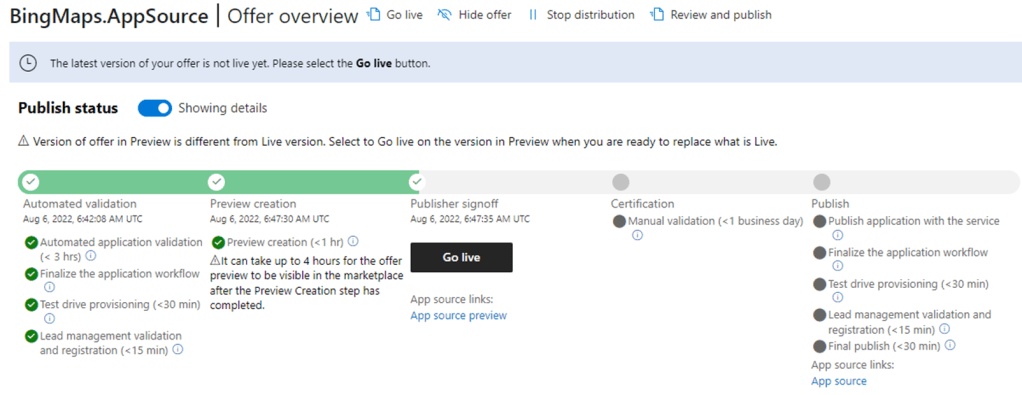
<p>This means that your partner center UI will look like this:</p>

<p><img src="/assets/images/2022/automatic-appsource-submission-of-business-central-apps/image.png" alt="" /></p>

<p>And you can press <strong>Go Live</strong> (or run <strong>Promote-AppSourceSubmission</strong>) in order to take the app live (or invoke certification / marketing validation)</p>

<h2 id="new-appsourcesubmission">New-AppSourceSubmission</h2>

<p>At this state, you can submit a new version for validation – you do not need to take the submission live. Submitting a new version of your app is done using the <strong>New-AppSourceSubmission</strong> function:</p>

<div class="language-plaintext highlighter-rouge"><div class="highlight"><pre class="highlight"><code>New-AppSourceSubmission -authContext $authContext -productId $product.Id -appFile $appFile -silent
Extracting C:\Users\freddyk\Downloads\BingMaps.AppSource-main-Apps-3.0.164.0\Freddy Kristiansen_BingMaps.AppSource_3.0.164.0.app
Automated validation........ Success
Preview Creation.......... Success
Publisher Signoff Success
New AppSource submission succeeded

resourceType       : Submission
state              : Published
substate           : ReadyToPublish
targets            : {@{type=Scope; value=Preview}}
resources          : {@{type=Availability; value=553dfb07-1fe0-6e19-a136-cf6f310127b4}, @{type=Listing; value=383dfff3-5479-dba7-7480-f61f3022ecfd}, @{type=Package; 
                     value=141ca192-e27b-4529-be55-f96de1e1710d}, @{type=Property; value=86c43c9b-6184-ff69-4621-a644cc167977}...}
publishedTimeInUtc : 2022-08-06T07:26:10.2335664Z
pendingUpdateInfo  : @{updateType=Create; status=Completed}
releaseNumber      : 31
friendlyName       : Submission 31
areResourcesReady  : True
id                 : 1152921505695131645
</code></pre></div></div>

<p>If you include the <strong>-autoPromote</strong> flag, the function will wait and automatically promote the submission to production / Go Live. If you include the <strong>doNotWait</strong> flag, the function will not wait for completion. If you include the <strong>autoPromote</strong> AND the <strong>doNotWait</strong> flag, the function will (in the current version) <strong>still wait</strong> for the preview creation to be complete and then promote the submission. For a later version of the API (when <strong>IsAutoPromote</strong> is supported for Business Central Apps) the function will be rewritten to utilize the API’s support of autoPromote instead of waiting and calling the API again.</p>

<p>This also means, that if you cancel the function while waiting for preview to complete – the <strong>autoPromote</strong> flag has no effect.</p>

<p>When you specify –<strong>LibraryAppFiles</strong> to <strong>New-AppSourceSubmission</strong>, you can specify an array of files. If you only specify one file, it is uploaded as is to Partner Center. If you specify an array of files, they will be zipped together into a file with the same name as the AppFile specified, followed by <strong>.libraries.zip</strong>, meaning that if you want to control the filename, you need to do the zipping yourself.</p>

<p>If your submission fails, you will be able to see the error message in the portal. Currently, I have not found a way to get the error message through the API. I have submitted a question for the team and expect to know more soon (and change the code)</p>

<p>Enjoy</p>

<p><strong><em>Freddy Kristiansen</em></strong><br />
Technical Evangelist</p>]]></content><author><name>Freddy Kristiansen</name></author><category term="BcContainerHelper" /><category term="CI/CD" /><category term="PowerShell" /><category term="AppSource" /><summary type="html"><![CDATA[A request from many partners have been to be able to automatically submit apps to AppSource Validation from their DevOps setup. The Ingestion API for Partner Center supports all offer types in AppSource and can be used to submit updates to Business Central apps to AppSource.]]></summary></entry><entry><title type="html">Working with AL-Go for GitHub preview</title><link href="https://freddysblog.com/2022/06/27/working-with-al-go-for-github-preview/" rel="alternate" type="text/html" title="Working with AL-Go for GitHub preview" /><published>2022-06-27T15:34:18+02:00</published><updated>2022-06-27T15:34:18+02:00</updated><id>https://freddysblog.com/2022/06/27/working-with-al-go-for-github-preview</id><content type="html" xml:base="https://freddysblog.com/2022/06/27/working-with-al-go-for-github-preview/"><![CDATA[<p>If you want to have the latest updates of AL-Go for GitHub, you can update your repository and use <a href="https://github.com/microsoft/al-go-pte@preview">https://github.com/microsoft/al-go-pte@preview</a> or <a href="https://github.com/microsoft/al-go-appsource@preview">https://github.com/microsoft/al-go-appsource@preview</a> as your template repository.</p>

<p>This means that you will get new updates before they are released. It also means that the actions you are using are instantly updated when we deploy a new version for preview and thus might be out of sync with your workflows.</p>

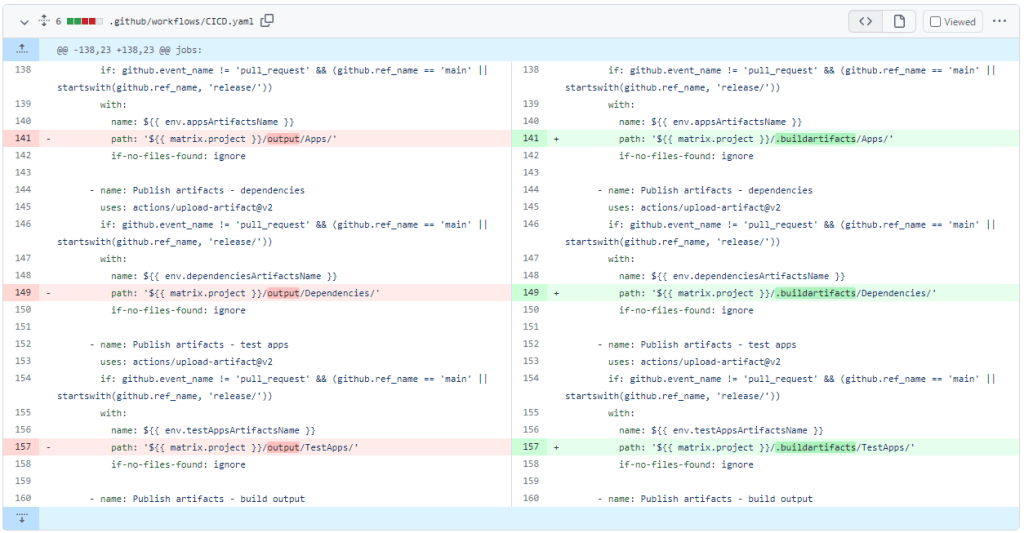
<p>One example of this is the preview, which was released yesterday (June 26th, 2022) to fix issue #168 will cause CI/CD workflows to stop publishing artifacts until you have run the Update AL-Go System Files.</p>

<p>Technically, the reason for this is that the RunPipeline action now published artifacts into a folder called .buildartifacts (instead of output) and the earlier CICD.yaml will look in the output folder:</p>

<p><img src="/assets/images/2022/working-with-al-go-for-github-preview/image.png" alt="" /></p>

<p>After updating the AL-Go System Files, everything will work normally again.</p>

<p>Note that this problem will NOT occur for people using the released bits. They can safely update to the latest version after it is released, and they will get workflows and actions updated together.</p>

<p>Enjoy</p>

<p><strong><em>Freddy Kristiansen</em></strong><br />
Technical Evangelist</p>]]></content><author><name>Freddy Kristiansen</name></author><category term="CI/CD" /><category term="AL-Go for GitHub" /><category term="preview" /><summary type="html"><![CDATA[If you want to have the latest updates of AL-Go for GitHub, you can update your repository and use https://github.com/microsoft/al-go-pte@preview or https://github.com/microsoft/al-go-appsource@preview as your template repository.]]></summary></entry><entry><title type="html">Invoke-ScriptInBcContainer</title><link href="https://freddysblog.com/2022/05/24/invoke-scriptinbccontainer/" rel="alternate" type="text/html" title="Invoke-ScriptInBcContainer" /><published>2022-05-24T14:34:06+02:00</published><updated>2022-05-24T14:34:06+02:00</updated><id>https://freddysblog.com/2022/05/24/invoke-scriptinbccontainer</id><content type="html" xml:base="https://freddysblog.com/2022/05/24/invoke-scriptinbccontainer/"><![CDATA[<p>As mentioned in <a href="/2022/05/19/major-improvement-when-invoking-scripts-in-containers/">this blog post</a>, the Invoke-ScriptInBcContainer has undergone some serious changes in BcContainerHelper 3.0.9, which just shipped.</p>

<p>This blog post will describe some details about how this function works.</p>

<p>The function takes a containerName, a scriptblock and an argument list as parameters and will execute this scriptblock inside the container.</p>

<p>The function does however have two ways of performing the exact same function. If the user is using PowerShell as administrator AND the setting called usePsSession is not specifically set to false, then the function will use PowerShell remoting to execute the PowerShell code snippet inside the container.</p>

<p>PowerShell remoting is only available when running with elevated permissions (as administrator). If you are not, or if you have set usePsSession to false – then the function will use docker exec to execute the PowerShell code snippet inside the container.</p>

<h2 id="using-powershell-remoting">Using PowerShell remoting</h2>

<p>Invoking a PowerShell snippet using PowerShell remoting is done by establishing a PowerShell Session to the container (caching that session for future use) and invoking the scriptblock using that session.</p>

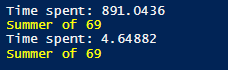
<p>Establishing a PowerShell session takes approx. 0.9 second (on my machine). Any subsequent usages of that session take approx. 4 milliseconds. The caching of the session is very important for performance on chatty scripts. To illustrate this, you can run this script:</p>

<div class="language-plaintext highlighter-rouge"><div class="highlight"><pre class="highlight"><code>$bcContainerHelperConfig.usePsSession = $true
$containerName = "bcserver"
Remove-BcContainerSession -containerName $containerName

Measure-Command {
    $what = Invoke-scriptInBcContainer $containerName -scriptBlock { Param($year)
        "Summer of $year"
    } -argumentList 69
} | ForEach-Object { Write-Host "Time spent: $($_.TotalMilliseconds)" }
Write-Host -ForegroundColor Yellow $what

$cnt = 100
Measure-Command {
    1..$cnt | % {
        $what = Invoke-scriptInBcContainer $containerName -scriptBlock { Param($year)
            "Summer of $year"
        } -argumentList 69
    }
} | ForEach-Object { Write-Host "Time spent: $($_.TotalMilliseconds/$cnt)" }
Write-Host -ForegroundColor Yellow $what
</code></pre></div></div>

<p>The output of this script on my machine is:</p>

<p><img src="/assets/images/2022/invoke-scriptinbccontainer/image-48.png" alt="" /></p>

<p><strong>NOTE</strong> that the subsequent runs <strong>ONLY</strong> is if the Invoke-ScriptInBcContainer happens in the <strong>SAME</strong> PowerShell session on the <strong>host</strong>.</p>

<h2 id="using-docker-exec">Using Docker Exec</h2>

<p>If PowerShell remoting is not possible (or you elect not to use it), BcContainerHelper will wrap your scriptblock in some pre- and post- code to best simulate that you are running in a session inside the container and write this PowerShell script to the disk in a folder, which is shared with the container (under the hostHelperFolder on the host).</p>

<p>Now it will serialize the parameters, converting all secureStrings to encrypted strings (else they would not be accessible inside the container) and use docker exec to run the PowerShell script file.</p>

<p>The return value is written to another file, picked up by the host after docker exec.</p>

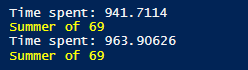
<p>Sounds cumbersome, but wrapped inside Invoke-ScriptInBcContainer is becomes easy to use. Running the same script as above (just with usePsSession set to false), reveals:</p>

<p><img src="/assets/images/2022/invoke-scriptinbccontainer/image-49.png" alt="" /></p>

<p>In this case, it doesn’t really matter whether the subsequent calls are in seperate PowerShell sessions.</p>

<h2 id="two-ways-of-running-your-pipelinesworkflows">Two ways of running your pipelines/workflows</h2>

<p>When running on Azure DevOps and using one DevOps task to create the container, another one to compile and another one to publish – each of these tasks are seperate PowerShell sessions and the difference between running using PowerShell remoting or Docker exec might not be as outspoken.</p>

<p>When running the Run-AlPipeline function (the do-it-all function used in later versions of the CI/CD HOL and also AL-Go for GitHub), everything happens in one PowerShell session, and it can really take advantage of using PowerShell sessions. Here we might see a 25% performance cut by using Docker exec.</p>

<p>AL-Go for GitHub even adds a RemoveBcContainer override when calling Run-AlPipeline in order to remove the session by killing the underlying process instead of removing the session and potentially hanging.</p>

<p>If you are using individual tasks, you have two options to avoid the famous freezing DevOps tasks:</p>

<ol>
  <li>Set UsePsSession to false</li>
  <li>Wrap your code in a try / finally, where you use Remove-BcContainerSession with -killPsSessionProcess in the finally section of your task.</li>
</ol>

<h2 id="error-handling-in-invoke-scriptinbccontainer">Error handling in Invoke-ScriptInBcContainer</h2>

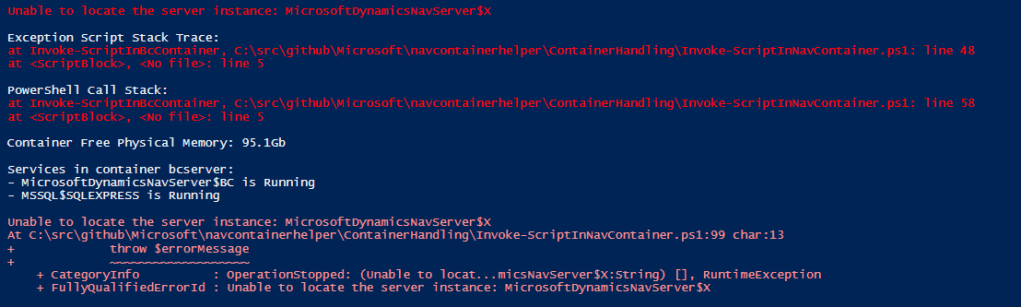
<p>In the latest version of BcContainerHelper, error handling using Invoke-ScriptInBcContainer has improved significantly.</p>

<p>Try running this script with UsePsSession true or false:</p>

<div class="language-plaintext highlighter-rouge"><div class="highlight"><pre class="highlight"><code>$appInfo = Invoke-scriptInBcContainer $containerName -scriptBlock {
    Get-NavAppInfo -ServerInstance X
}
</code></pre></div></div>

<p>As there is no serverInstance X – it will fail, but it does add some additional information:</p>

<p><img src="/assets/images/2022/invoke-scriptinbccontainer/image-50.png" alt="" /></p>

<p>this was certainly not the case before 3.0.9:-)</p>

<p>As a bonus, it will actually dump all event log entries that have been added while the script was running. It will also investigate whether any of the event log entries is an out-of-memory exception and if that is the case, it will re-throw an out-of-memory exception.</p>

<p>You will also see whether your script caused the ServiceTier to crash and end up as not running.</p>

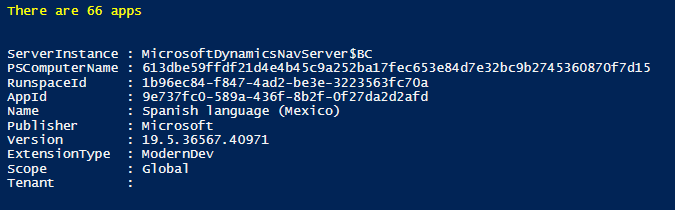
<h2 id="returning-objects">Returning objects</h2>

<p>Now try to run this script:</p>

<div class="language-plaintext highlighter-rouge"><div class="highlight"><pre class="highlight"><code>$appInfo = Invoke-scriptInBcContainer -containerName $containerName -scriptBlock {
    Get-NavAppInfo -ServerInstance $serverInstance
}
Write-Host -ForegroundColor Yellow "There are $($appInfo.Count) apps"
$appInfo[0] | Out-Host
</code></pre></div></div>

<p>You will see a slightly different output. When running using a PsSession, the serialized objects have a few extra fields added:</p>

<p><img src="/assets/images/2022/invoke-scriptinbccontainer/image-51.png" alt="" /></p>

<p>The PSComputerName and RunspaceId are added to all objects serialized from Invoke-ScriptInBcontainer to the host. You can just ignore these; I do not use them for anything and I haven’t done any effort to try and remove them.</p>

<h2 id="you-cannot-return-a-securestring">You cannot return a SecureString</h2>

<p>Only known limitation to using Invoke-ScriptInBcContainer with Docker Exec is, that you cannot return a SecureString from the container. Oher than that, there should be parity between the functionality of using PsSession and Docker Exec.</p>

<p>If not, please file an issue on <a href="https://github.com/microsoft/navcontainerhelper/issues">https://github.com/microsoft/navcontainerhelper/issues</a>.</p>

<p>Enjoy</p>

<p><strong><em>Freddy Kristiansen</em></strong><br />
Technical Evangelist</p>]]></content><author><name>Freddy Kristiansen</name></author><category term="BcContainerHelper" /><category term="Docker" /><category term="Invoke-ScriptInBcContainer" /><category term="PowerShell Session" /><category term="Session" /><summary type="html"><![CDATA[As mentioned in this blog post, the Invoke-ScriptInBcContainer has undergone some serious changes in BcContainerHelper 3.0.9, which just shipped.]]></summary></entry><entry><title type="html">Major improvement when invoking scripts in Containers…</title><link href="https://freddysblog.com/2022/05/19/major-improvement-when-invoking-scripts-in-containers/" rel="alternate" type="text/html" title="Major improvement when invoking scripts in Containers…" /><published>2022-05-19T20:36:57+02:00</published><updated>2022-05-19T20:36:57+02:00</updated><id>https://freddysblog.com/2022/05/19/major-improvement-when-invoking-scripts-in-containers</id><content type="html" xml:base="https://freddysblog.com/2022/05/19/major-improvement-when-invoking-scripts-in-containers/"><![CDATA[<p>I recently learned that some partners have had had issues when running build pipelines on Azure DevOps with multiple DevOps agents on the same host using Containers with process isolation. 1-2 years ago, we did a number of fixes to support multiple agents on the same host, and I thought that had fixed things, but apparently this was not true.</p>

<p>Hopefully the fixes, which are going into BcContainerHelper today will fix this once and for good.</p>

<h2 id="not-a-bccontainerhelper-problem">Not a BcContainerHelper problem</h2>

<p>My immediate thinking was that this is not a BcContainerHelper problem, but that doesn’t mean that it cannot be fixed in BcContainerHelper. There are several workarounds in BcContainerHelper to cope with wrongdoings of other software packages, even just-in-time patching of Business Central some times.</p>

<p>I learned that people were seeing their DevOps tasks complete and then freeze. Everything was A-OK but the pipeline would just hang and eventually timeout and fail. I had even seen the same once on GitHub Actions, but some partners were complaining that they had this very frequently.</p>

<p>There was a bug files on Azure Pipelines <a href="https://github.com/microsoft/azure-pipelines-tasks/issues/15819">here</a>, and then another bug on BcContainerHelper <a href="https://github.com/microsoft/navcontainerhelper/issues/2469">here</a>. Julian from GWS was so kind to setup a repository on Azure DevOps, running 20 simultaneous builds and almost certain, that at least one would fail in every run.</p>

<p>I got access to the repo and started debugging. My first hunch was, that some process, thread or job was running on the agent and the DevOps agent would wait for this to complete before finishing the task.</p>

<p>I was right!</p>

<h2 id="the-pssession">The PsSession</h2>

<p>It turned out to be the PsSession, which is a PowerShell session, which is created by Invoke-ScriptInBcContainer, cached and re-used again and again. First attempt was to just remove the PsSession, but this also caused the task to freeze.</p>

<p>The problem seemed to be that removing the session (using the PowerShell command Remove-PsSession) would hang – and exiting the PowerShell task would implicitly remove the session, meaning that the task would hang – some times.</p>

<h2 id="2-solutions-possible">2 solutions possible</h2>

<p>There could only be two solutions:</p>

<ol>
  <li>Find a better way to remove the session</li>
  <li>Avoid using the session</li>
</ol>

<p>and I kind of found a solution to both.</p>

<h2 id="find-a-better-way-to-remove-the-session">Find a better way to remove the session</h2>

<p>I did manage to find a way, where I could remove the session without freezing PowerShell. Instead of using Remove-PsSession, I could locate the process ID of the session (using process isolation, this process ID is the process ID on the host) and simply stop the process.</p>

<p>This works – but unfortunately, I don’t have any way of intercepting the implicit session removal when the PowerShell task is ending, so it would still freeze if I didn’t remove the session manually.</p>

<p>I don’t think the right solution would be to ask everybody to remove all sessions in all tasks in all pipelines – we need a better solution.</p>

<h2 id="avoid-using-the-pssession">Avoid using the PsSession</h2>

<p>This was a fairly easy fix. Add</p>

<div class="language-plaintext highlighter-rouge"><div class="highlight"><pre class="highlight"><code>"UsePsSession":  false
</code></pre></div></div>

<p>To c:\ProgramData\BcContainerHelper\BcContainerHelper.config.json and you should be good. This causes Invoke-ScriptInBcContainer to use docker exec instead of a PsSession.</p>

<p>It actually packages your scriptblock in a script .ps1 file, encodes the parameters and uses docker exec to run the script. Return values are written to another file and then returned from the function, but… – to be honest I never did much optimization of running Invoke-ScriptInBcContainer without a PsSession and I was almost certain that there would be bugs.</p>

<p>I was pleased to see that most bugs were in error handling. If something went wrong in the scriptblock, then the error wasn’t returned correctly. Beside this, the old version didn’t support if hostHelperFolder is different from ContainerHelperFolder. This could be a problem for some.</p>

<p>In the next pre-release of BcContainerHelper, these issues are fixed, and you should now get the correct error surfaced from the function. This new functionality could potentially break behavior, so I have added a setting, which you can set to false to get the “old and faulty” behavior back (if this worked for you):</p>

<div class="language-plaintext highlighter-rouge"><div class="highlight"><pre class="highlight"><code>$bcContainerHelperConfig.addTryCatchToScriptBlock = $false
</code></pre></div></div>

<p>If you discover an example where the new behavior doesn’t work, please don’t just set this setting to false and live with it. Please open an issue on <a href="https://github.com/microsoft/navcontainerhelper/issues">https://github.com/microsoft/navcontainerhelper/issues</a> and explain which scriptblock the new mechanism doesn’t work with.</p>

<h2 id="out-of-memory">Out of memory</h2>

<p>Additionally, one type of error, which has been hard to detect earlier is Out Of Memory. When I (inside an Invoke-ScriptInBcContainer) use the PowerShell CmdLet to publish an app to the service tier and this causes the servicetier to crash due to lack of memory, I would typically get errors like: “The socket connection was aborted.” as this is what the PowerShell session sees.</p>

<p>In this new version (both using sessions and docker exec), I will (if the scriptblock throws an exception) inspect the eventlog for entries pushed by Business Central or MS SQL – and if any of those have thrown an OutOfMemory exception, I will throw an OutOfMemory error (the root cause) instead of the socket connection error (the symptom).</p>

<p><img src="/assets/images/2022/major-improvement-when-invoking-scripts-in-containers/image-46.png" alt="" /></p>

<p>This should help the troubleshooting in some cases.</p>

<h2 id="the-pre-release">The pre-release</h2>

<p>So, if you have had this problem in your pipelines, please install the next pre-release (preview605 or newer) of BcContainerHelper on your agents and add this setting to bcContainerHelper.settings.json on your agents:</p>

<div class="language-plaintext highlighter-rouge"><div class="highlight"><pre class="highlight"><code>"UsePsSession":  false
</code></pre></div></div>

<p>Then this should fix the issue. Let me know whether it works. I was considering adding the setting as default for GitHub Actions and Azure Pipelines, but it does have a performance impact, so I decided not to.</p>

<p>BTW. Even though I only saw this once on AL-Go for GitHub, I will (in the next version) use the mechanism to stop the PsSession process by default, meaning that AL-Go for GitHub should not have hanging sessions.</p>

<p>Thanks</p>

<p><strong><em>Freddy Kristiansen</em></strong><br />
Technical Evangelist</p>]]></content><author><name>Freddy Kristiansen</name></author><category term="BcContainerHelper" /><category term="Docker" /><category term="Azure DevOps" /><category term="Freeze" /><category term="GitHub Actions" /><category term="Hang" /><category term="Pipeline" /><category term="Workflow" /><summary type="html"><![CDATA[I recently learned that some partners have had had issues when running build pipelines on Azure DevOps with multiple DevOps agents on the same host using Containers with process isolation. 1-2 years ago, we did a number of fixes to support multiple agents on the same host, and I thought that had fixed things, but apparently this was not true.]]></summary></entry><entry><title type="html">Secrets in AL-Go for GitHub</title><link href="https://freddysblog.com/2022/05/14/secrets-in-al-go-for-github/" rel="alternate" type="text/html" title="Secrets in AL-Go for GitHub" /><published>2022-05-14T09:24:53+02:00</published><updated>2022-05-14T09:24:53+02:00</updated><id>https://freddysblog.com/2022/05/14/secrets-in-al-go-for-github</id><content type="html" xml:base="https://freddysblog.com/2022/05/14/secrets-in-al-go-for-github/"><![CDATA[<p>This blog post will not reveal any secrets in AL-Go for GitHub:-)</p>

<p>Instead, it will explain ways for you to store secrets, which are used for AL-Go for GitHub. In almost every DevOps setup, you will have to store some keys, passwords, tokens or like. In GitHub, these are called secrets and AL-Go will look for a set of secrets by their name.</p>

<p>This blog post will also touch upon how you can use GitHub organizations and environments with your customer projects.</p>

<h2 id="github-secrets-vs-azure-keyvault">GitHub secrets vs. Azure KeyVault</h2>

<p>AL-Go for GitHub supports two ways of storing your secrets, <strong>GitHub secrets</strong> or Azure KeyVault. If you store your secrets in an <strong>Azure KeyVault</strong> you need to provide access to the Azure KeyVault using a GitHub secret. This is done by following <a href="https://docs.microsoft.com/en-us/azure/developer/github/github-key-vault">this guideline</a> including the <strong>Add a role assignment</strong> step. The location of the GitHub secret created determines the access to the KeyVault, meaning that you can have and use multiple KeyVaults if you like.</p>

<p>GitHub secrets can be <strong>repository secrets</strong>, created for a single <strong>repository</strong>, they can be <strong>organization secrets</strong>, created one or more repositories in the <strong>organization</strong> or they can be <strong>environment secrets</strong>, created for a <strong>single environment</strong>.</p>

<p>You can set GitHub secrets through the GitHub API (or GH command line), but you cannot access the secrets from your local machine.</p>

<h2 id="repository-secrets">Repository secrets</h2>

<p>Repository secrets are available to all repositories (private or public, personal or organizational). If a secret is created for a repository, it is only accessible within GitHub actions for that repository. Repository secrets are not included when forking a repository (obviously).</p>

<p>For repositories created under your personal account, this is really the only place you can store secrets for the workflows. For repositories created under an organization, you can also use organization secrets.</p>

<h2 id="organization-secrets">Organization secrets</h2>

<p>If a secret is created for an organization, you can select which repositories the secret should be available for:</p>

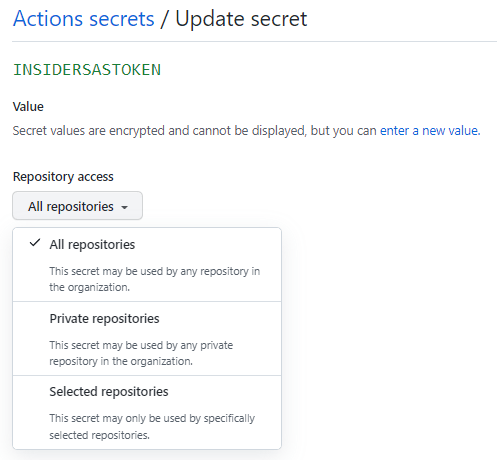
<p><img src="/assets/images/2022/secrets-in-al-go-for-github/image-43.png" alt="" /></p>

<p>The <strong>InsiderSasToken</strong> is a good example of an organization secret, which typically is available to all repositories and when you renew the value of the token every 6 months, it automatically renews for all repos.</p>

<p>The <strong>LicenseFileUrl</strong> is an example of an organization secret, which typically will be available to a selected number of repositories. If you have two different License files, which each should be available to a number of repositories, you specify which secret to use in the settings of the individual repository. More about this later.</p>

<h2 id="environment-secrets">Environment secrets</h2>

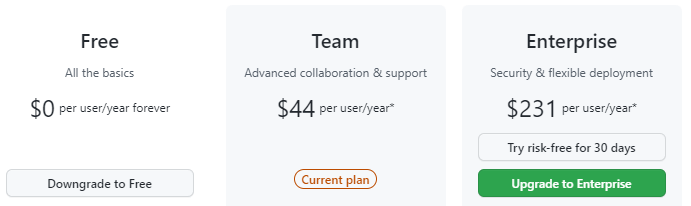
<p>If a secret is created for an environment, the secret is only available during deployment to that environment. Environments (and thus also environment secrets) are only available for public repositories or for repositories in organizations with Teams or Enterprise subscription.</p>

<p>Currently, you can place 3 secrets under the environment:</p>

<ul>
  <li><strong>EnvironmentName</strong> contains the actual Business Central Environment name. If not specified, the name of the environment in GitHub is used.</li>
  <li><strong>AuthContext</strong> contains the authorization context for the environment.</li>
  <li><strong>Projects</strong> is only used if the repository is multi-project. The secret contains a comma separated list of the projects to be published to the environment. Default is all. (Note that every project can have multiple apps, which are all included)</li>
</ul>

<p>If you are using a private repository in a free GitHub subscription, where environments are not available, you can create environments in the settings file and you can create these secrets as **<environmentname>\_EnvironmentName** and **<environmentname>\_AuthContext**.</environmentname></environmentname></p>

<p>At the time writing this blog post, you cannot specify projects unless using environment secrets. In a future version, it will be possible to specify projects as a setting instead.</p>

<h2 id="priority-order">Priority order</h2>

<p>If secrets exist in multiple places, the order of priority is</p>

<ol>
  <li>Environment secret</li>
  <li>Repository secret</li>
  <li>Organization secret</li>
  <li>Azure KeyVault specified in environment secret</li>
  <li>Azure KeyVault specified in repository secret</li>
  <li>Azure KeyVault specified in organization secret</li>
</ol>

<p>As earlier stated, environment secrets are only available during deployment to the specific environment.</p>

<h2 id="forks">Forks</h2>

<p>If you fork a GitHub repository to your personal or organization account, you obviously do NOT get a copy of the secrets from that repository. GitHub actions in the main repository, also cannot access the secrets while running a CI/CD workflow based on a Pull Request from a fork (<strong>An evil PR could reveal the secrets</strong>).</p>

<p>This means that if your repository contains an AppSource App (which currently always requires a license file URL), you will always get this error during the CI/CD workflow run on the Pull Request from a fork:</p>

<p><img src="/assets/images/2022/secrets-in-al-go-for-github/image-45.png" alt="" /></p>

<p>and in the details:</p>

<p><img src="/assets/images/2022/secrets-in-al-go-for-github/image-44.png" alt="" /></p>

<p>If you review the code and decide to merge anyway, the CI/CD workflow will re-run based on the commit and will now have access to the secrets.</p>

<p>For this and other reasons, <a href="/2022/05/03/branching-strategies-for-your-al-go-for-github-repo/">the recommendation is to use feature branches</a>, from which the Pull Request will have access to the necessary secrets and the ability to build, publish and test your app.</p>

<p>In a future version AL-Go we will modify the CI/CD workflow to still perform the compile during the Pull Request but skip the publish step and the test run step and replace the error with a warning stated that the app has not been published and tested.</p>

<h2 id="named-secrets">Named secrets</h2>

<p>AL-Go for GitHub uses settings and secrets to enable functionality.</p>

<p>If the Code Sign certificate secrets are available, then the CI/CD workflow automatically signs your app, if the LicenseFileUrl secret is available, it is used during build, if a StorageContext secret is available, the CI/CD workflow will automatically publish build artifacts to a storage account, etc. etc.</p>

<p>Below is a list of named secrets you can create in order to get and use additional functionality.</p>

<table><tbody><tr><td>GhTokenWorkflow</td><td>Whenever you run the <strong>Update AL-Go System Files</strong> workflow, you will need a secret called GhTokenWorkflow containing a personal access token with workflow permissions, like described <a rel="noreferrer noopener" href="https://github.com/microsoft/AL-Go/blob/main/Scenarios/UpdateAlGoSystemFiles.md" target="_blank">here</a>.</td></tr><tr><td>InsiderSasToken</td><td>The Insider Sas Token is available for partners on <a rel="noreferrer noopener" href="https://aka.ms/collaborate" target="_blank">https://aka.ms/collaborate</a> to allow access to insider (future) builds of Business Central. This secret is needed for the <strong>Test Next Minor </strong>and <strong>Test Next Major </strong>workflows.</td></tr><tr><td>LicenseFileUrl</td><td>For <strong>AppSource apps</strong>, you need to specify a direct download URL to your license file in this secret.</td></tr><tr><td>CodeSignCertificateUrl<br />and<br />CodeSignCertificatePassword</td><td>For <strong>AppSource apps</strong>, you need to specify a code signing certificate. The secret named CodeSignCertificateUrl needs to contain a direct download URL to your code signing certificate in .pfx format and a secret named CodeSignCertificatePassword needs to contain the pfx password.</td></tr><tr><td>KeyVaultCertificateUrl,<br />KeyVaultCertificatePassword<br />and<br />KeyVaultClientId<br /></td><td>If your<strong> AppSource app</strong> needs KeyVault access, you need to provide these three secrets according to the requirements described <a rel="noreferrer noopener" href="https://github.com/microsoft/AL-Go/blob/preview/Scenarios/EnableKeyVaultForAppSourceApp.md" target="_blank">here</a>.</td></tr><tr><td>StorageContext</td><td>If you specify a StorageContext secret, your app artifacts are copied to a storage account using the specifications in the StorageContext secret.</td></tr><tr><td>&lt;environmentName&gt;_AuthContext<br />&lt;environmentName&gt;-AuthContext<br />AuthContext</td><td>If your <strong>authorization context</strong> is specified as an environment secret, it can be named AuthContext, else you need to create a secret with the environment name followed by underscore or dash and AuthContext, like described <a rel="noreferrer noopener" href="/2022/05/06/deployment-strategies-and-al-go-for-github/" target="_blank">here</a>.</td></tr><tr><td>&lt;environmentName&gt;_EnvironmentName<br />&lt;environmentName&gt;-EnvironmentName<br />EnvironmentName</td><td>If your actual <strong>environment name </strong>is different from the environment name in AL-Go for GitHub, you need an EnvironmentName secret as described <a rel="noreferrer noopener" href="/2022/05/06/deployment-strategies-and-al-go-for-github/" target="_blank">here</a>.</td></tr></tbody></table>

<p>When adding new functionality to AL-Go for GitHub, more secrets might be added.</p>

<h2 id="secret-name-indirections">Secret name indirections</h2>

<p>As already mentioned, secrets are located by name and secrets can be shared between multiple repositories. Let’s say you have two License files. One license file should be used for 5 of your repositories and another license file should be used for another 5 of your repositories. You can however not create two organization secrets called LicenseFileUrl and assign them to 5 repositories each and you don’t really want to add the secrets to the individual repositories, as this means you would have to modify every single repo when you have an update to the secret.</p>

<p>For this, you can use secret name indirections. In the individual repository, you can create a setting called <strong>LicenseFileUrlSecretName</strong> containing the value <strong>ContosoLicenseFile</strong>, then the secret called ConsotoLicenseFile is used as LicenseFileUrl in this repository.</p>

<p>The same mechanism can be used for all secrets. Create a setting in the repository called **<secretname>SecretName** and your secret will be read from that name instead.</secretname></p>

<h2 id="recommendations">Recommendations</h2>

<p>My recommendation when it comes to organizations and secrets are as follows:</p>

<ul>
  <li><strong>One GitHub organization per partner (use Teams or Enterprise subscription)</strong>
    <ul>
      <li>for IP owned by the partner</li>
      <li>Use organizational secrets for developer license, certificates etc.</li>
      <li>Use environment secrets for authorization to customer environments</li>
      <li>Setup self-hosted agents for the organization to improve build performance</li>
    </ul>
  </li>
  <li><strong>One GitHub organization per customer (Free or Teams license)</strong>
    <ul>
      <li>for IP owned by or shared with the customer</li>
      <li>use organization secrets for authorization to customer environments</li>
      <li>Optionally use self-hosted agents for performance</li>
    </ul>
  </li>
</ul>

<p>Hope this helps</p>

<p><strong><em>Freddy Kristiansen</em></strong><br />
Technical Evangelist</p>]]></content><author><name>Freddy Kristiansen</name></author><category term="CI/CD" /><category term="Azure KeyVault" /><category term="Environments" /><category term="Forks" /><category term="GitHub Secrets" /><category term="Organization" /><category term="Repository" /><category term="Secrets" /><summary type="html"><![CDATA[This blog post will not reveal any secrets in AL-Go for GitHub:-)]]></summary></entry><entry><title type="html">Resilience</title><link href="https://freddysblog.com/2022/05/10/resilience/" rel="alternate" type="text/html" title="Resilience" /><published>2022-05-10T13:58:57+02:00</published><updated>2022-05-10T13:58:57+02:00</updated><id>https://freddysblog.com/2022/05/10/resilience</id><content type="html" xml:base="https://freddysblog.com/2022/05/10/resilience/"><![CDATA[<p>Lately we have been seeing an increasing number of people having difficulties creating Docker containers on multiple host OS’. Since Thursday, I have been diving into error reports on GitHub, looking in Telemetry and had some partners helping out trying various tests to see what the result of various changes would be.</p>

<p>As an example, achim-t have run test scripts at least 20 times <a href="https://github.com/microsoft/AL-Go/issues/103">here</a>, since it wasn’t possible for me to repro the problems, but also <a href="https://github.com/microsoft/navcontainerhelper/issues/2434">this</a>, <a href="https://github.com/microsoft/navcontainerhelper/issues/2374">this</a> and several other issues are from people having issues. Typically, the problem goes away when you use hyperv isolation, when you switch off Windows Defender or other anti-virus software – or when you are running on a Windows Server OS.</p>

<h2 id="new-generic-image">New Generic Image</h2>

<p>As a result, a new generic image (<strong>currently version 1.0.2.4</strong>), which should resolve most of these issues (for <strong>NAV/BC versions 15 and up</strong>) is available in preview at this time – add <strong>-dev</strong> to the generic image name and you will get the preview.</p>

<div class="language-plaintext highlighter-rouge"><div class="highlight"><pre class="highlight"><code>-useGenericImage "$(Get-BestGenericImageName)-dev"
</code></pre></div></div>

<p>Also, the latest BcContainerHelper preview will automatically select the preview image when creating containers, there you don’t have to do anything. The next BcContainerHelper will even present you with a <strong>warning if you are running an OS, isolation mode and/or NAV/BC version</strong> which might require you to <strong>use Hyper-V or switch off Windows Defender</strong> while creating the container.</p>

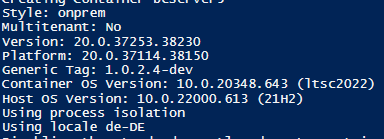
<p>You can determine which generic image version you are using by looking for the <strong>Generic Tag</strong> in the container output (the -dev part is included in the next BcContainerHelper version):</p>

<p><img src="/assets/images/2022/resilience/image-42.png" alt="" /></p>

<p>The <strong>new generic image</strong> will likely be promoted to <strong>prod</strong> within the next week, so please let me know if you run into any issues when using this version, by creating an issue on <a href="https://github.com/microsoft/navcontainerhelper/issues">https://github.com/microsoft/navcontainerhelper/issues</a>.</p>

<p><strong>Note</strong>: Do not respond to other people’s issues – create your own, thanks.</p>

<p>Thanks</p>

<p><strong><em>Freddy Kristiansen</em></strong><br />
Technical Evangelist</p>]]></content><author><name>Freddy Kristiansen</name></author><category term="BcContainerHelper" /><category term="Docker" /><summary type="html"><![CDATA[Lately we have been seeing an increasing number of people having difficulties creating Docker containers on multiple host OS’. Since Thursday, I have been diving into error reports on GitHub, looking in Telemetry and had some partners helping out trying various tests to see what the result of various changes would be.]]></summary></entry><entry><title type="html">Deployment strategies and AL-Go for GitHub</title><link href="https://freddysblog.com/2022/05/06/deployment-strategies-and-al-go-for-github/" rel="alternate" type="text/html" title="Deployment strategies and AL-Go for GitHub" /><published>2022-05-06T14:08:07+02:00</published><updated>2022-05-06T14:08:07+02:00</updated><id>https://freddysblog.com/2022/05/06/deployment-strategies-and-al-go-for-github</id><content type="html" xml:base="https://freddysblog.com/2022/05/06/deployment-strategies-and-al-go-for-github/"><![CDATA[<p>When you are done developing your app, it needs to be deployed to your customers if it is a PTE or to AppSource if it is an AppSource app.</p>

<p>Currently we don’t have any automated way of publishing your app to AppSource – that is something we are working on and some day in the future, when it becomes possible, you will get a workflow in AL-Go for GitHub which handles this automatically.</p>

<p>This blog post will talk about PTEs, and what features are available in AL-Go for GitHub to assist you deploying your PTEs to customers.</p>

<h2 id="environments">Environments</h2>

<p>In this blog post I will distinguish between 4 different types of environments:</p>

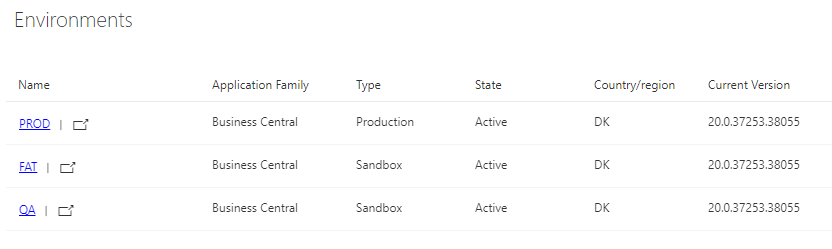
<p>The <strong>DEV environment</strong> (Development) which currently can be a local docker based environment or an online sandbox environment, but in the future, you will also be able to use hosted docker based environment or Azure Container Instances or Azure VMs. Stay tuned for this functionality coming to a repository near you.</p>

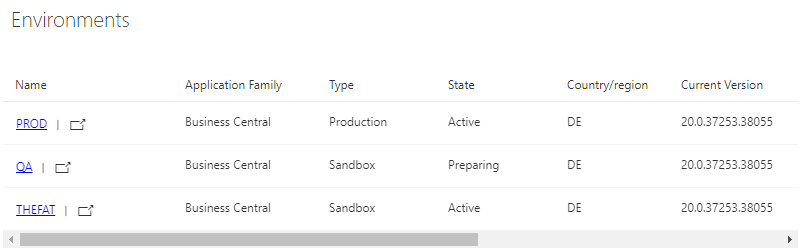
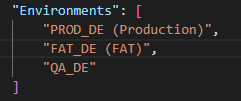
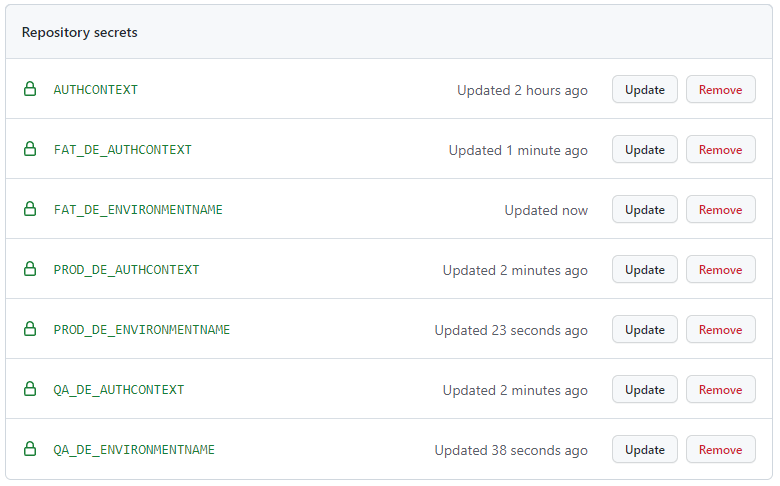
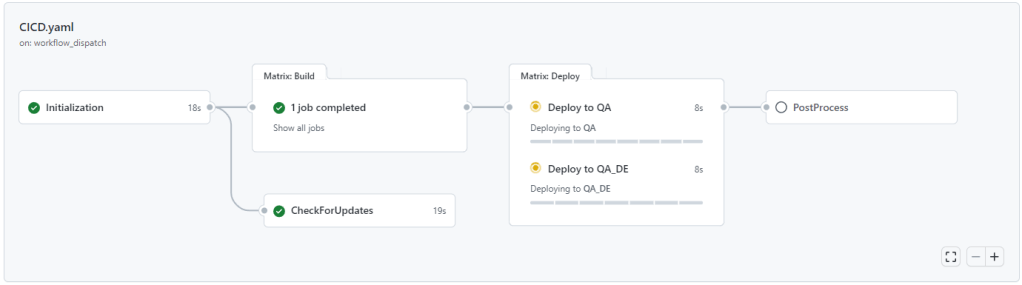
<p>The <strong>QA environment</strong> (Quality Assurance) is an online sandbox environment, which always holds the latest successful build of your app. This environment contains standard demo data from Business Central and your app and is the environment for which continuous deployment is setup.</p>

<p>The <strong>FAT environment</strong> (Final Acceptance Test) is an online sandbox environment, which is a copy of the customers production environment and is used to allow the customer to test the solution before releasing to production.</p>

<p>The <strong>PROD environment</strong> (Production) is your customers live production environment. Only released bits makes it to the production environment, which is the life nerve of your customer.</p>

<p>You might have different terminologies, or you might have different needs, but the essence of these 3 environments is, that the QA environment is subject to continuous deployment for every successful build from main. The FAT environment is where you publish your release candidate to allow your customer hands on and the PROD environment is the holy grail.</p>

<p>The actual creation of the environments is not part of AL-Go for GitHub – the environments are created in the Dynamics 365 Business Central admin center.</p>

<p>In this blog post, I will explain how to setup deployment for these 3 types of environments for one project to one or two different customers, both using the Environments feature in GitHub, which comes with paid licenses or the settings file option from AL-Go for GitHub.</p>

<p>In my case, my GitHub organization (<strong>BusinessCentralApps</strong>) is a paid Team license:</p>

<p><img src="/assets/images/2022/deployment-strategies-and-al-go-for-github/image-19.png" alt="" /></p>

<h2 id="setting-up-environments-using-github-environments">Setting up environments using GitHub Environments</h2>

<p>I created these three environments in my <strong>Admin Center</strong>:</p>

<p><img src="/assets/images/2022/deployment-strategies-and-al-go-for-github/image-18.png" alt="" /></p>

<p>In my repository (<strong><a href="https://github.com/BusinessCentralApps/Contoso-App3">Contoso-App3</a></strong>), under <a href="https://github.com/BusinessCentralApps/Contoso-App3/settings/environments"><strong>Settings</strong> -&gt; <strong>Environments</strong></a>, I have added 3 environments, with no additional settings.</p>

<p><img src="/assets/images/2022/deployment-strategies-and-al-go-for-github/image-21.png" alt="" /></p>

<p><strong>Note</strong> that I have added an annotation to the final acceptance test environment and the production environment. All environments with annotations like <strong>(FAT)</strong>, <strong>(PROD)</strong>, <strong>(Final Acceptance Test)</strong> or <strong>(Production)</strong> will be ignored by the continuous deployment step in the CI/CD workflow. Environments created as production environments in Admin Center cannot be used for continuous deployment (even if the environment doesn’t have any annotation).</p>

<p>If the name of the environment in the admin center is different from name in environments, you can create an environment secret called <strong>EnvironmentName</strong> under the environment, containing the actual environment name:</p>

<p><img src="/assets/images/2022/deployment-strategies-and-al-go-for-github/image-22.png" alt="" /></p>

<p>Note, that it you enter the value in Upper Case, the actual environment name will be hidden in the output of the workflow.</p>

<p>You can also create a repository secret called <strong>MyFAT_EnvironmentName</strong> if you prefer to have your secrets in the repository instead of under the Environment.</p>

<p>You also need to setup authentication to the environments. For this, you can setup S2S like described here, or you can use delegation and create your AUTHCONTEXT secret value using this PowerShell script (on a machine with the <strong>BcContainerHelper 3.0.8 or higher</strong>):</p>

<div class="language-plaintext highlighter-rouge"><div class="highlight"><pre class="highlight"><code>$AuthContext = New-BcAuthContext -includeDeviceLoginGet-ALGoAuthContext -bcAuthContext $AuthContext | Set-Clipboard
</code></pre></div></div>

<p>In the repository, under Settings -&gt; Secrets -&gt; Actions click New Repository Secret and create a secret called AUTHCONTEXT with this value.</p>

<p><img src="/assets/images/2022/deployment-strategies-and-al-go-for-github/image-23.png" alt="" /></p>

<p>After this, I can run the <strong>CI/CD</strong> workflow and see that my <strong>QA</strong> environment (and only my QA environment) receives my App3.</p>

<p><img src="/assets/images/2022/deployment-strategies-and-al-go-for-github/image-24.png" alt="" /></p>

<p>Every time you add features and functionality to our app and complete a pull request to the main branch, the CI/CD branch will run and deploy to the QA environment.</p>

<p><img src="/assets/images/2022/deployment-strategies-and-al-go-for-github/image-25.png" alt="" /></p>

<p>After the development is done, you run the <strong>Publish To Environment</strong> workflow, select which build to publish (<strong>latest</strong> is the latest build) and enter the name of your <strong>Final Acceptance Test</strong> name (<strong>MyFAT</strong> in our case):</p>

<p><img src="/assets/images/2022/deployment-strategies-and-al-go-for-github/image-27.png" alt="" /></p>

<p>After the workflow completes</p>

<p><img src="/assets/images/2022/deployment-strategies-and-al-go-for-github/image-28.png" alt="" /></p>

<p>We can investigate the deploy step and see the actual name of our environment</p>

<p><img src="/assets/images/2022/deployment-strategies-and-al-go-for-github/image-29.png" alt="" /></p>

<p>Now, the customer will perform final acceptance test of the solution and if he discovers any bugs, we will fix the bugs and redeploy to the FAT environment.</p>

<p>If you look in the output, you will notice that when publishing to environments of type <strong>Sandbox</strong>, AL-Go for Github will use the <strong>development endpoint</strong>.</p>

<p>When the solution has been accepted by the customer, we create a release of the app:</p>

<p><img src="/assets/images/2022/deployment-strategies-and-al-go-for-github/image-30.png" alt="" /></p>

<p>when done, we can publish to PROD</p>

<p><img src="/assets/images/2022/deployment-strategies-and-al-go-for-github/image-31.png" alt="" /></p>

<p>and looking at the workflow output, you will see that the <strong>automation API</strong> is used for the deployment:</p>

<p><img src="/assets/images/2022/deployment-strategies-and-al-go-for-github/image-32.png" alt="" /></p>

<p>at the same time, the <strong>Create Release</strong> workflow also updated the version number in the repository, and you can now work on the next version of your app.</p>

<h2 id="environment-protection-rules">Environment protection rules</h2>

<p>When using the environments feature in GitHub, you can setup environment protection to ensure that the customer (or customer responsible) approves the deployment before it actually happens.</p>

<p><img src="/assets/images/2022/deployment-strategies-and-al-go-for-github/image-33.png" alt="" /></p>

<h2 id="individual-authcontext">Individual AUTHCONTEXT</h2>

<p>If the <strong>PROD</strong> environment uses a <strong>different authorization context</strong> than the <strong>QA</strong> and <strong>FAT</strong> environments, you can create an environment secret (a secret defined under the Environment in the repository) called <strong>AUTHCONTEXT</strong> and this will override the global <strong>AUTHCONTEXT</strong> secret when deploying to <strong>PROD</strong>. You can also create a repository secret called <strong>PROD_AUTHCONTEXT</strong>, which also will take precedence over the global AUTHCONTEXT for the PROD environment.</p>

<h2 id="setup-environments-when-using-a-free-github-tier">Setup environments when using a free GitHub tier</h2>

<p>Even though the environments feature is not available when using a free GitHub subscription, AL-Go for GitHub still allows you to publish to environments.</p>

<p>Obviously, you cannot setup <strong>environment protection rules</strong> and you cannot have <strong>environment secrets</strong>, but you can create your environments in the repository settings file and you can use repository secrets like **<environmentName>\_<secretName>** to add “environment secrets”. These secrets will obviously be available throughout the workflows, but AL-Go for GitHub will use them during deployment.</secretName></environmentName></p>

<p>In a different Business Central tenant (another customer who also want our app), I have added 3 new environments (DE):</p>

<p><img src="/assets/images/2022/deployment-strategies-and-al-go-for-github/image-34.png" alt="" /></p>

<p>When you have multiple customers for one repository, you will likely name the environments in AL-Go for GitHub after the name of the customer or like.</p>

<p>I have added 3 additional environments from a different customer to our repository using the repository settings file (.github\AL-Go-Settings.json):</p>

<p><img src="/assets/images/2022/deployment-strategies-and-al-go-for-github/image-35.png" alt="" /></p>

<p>and added repository secrets for the actual name and the authorization context for these environments:</p>

<p><img src="/assets/images/2022/deployment-strategies-and-al-go-for-github/image-36.png" alt="" /></p>

<p>and now, when I run the CI/CD workflow, I can see that it deploys to two QA environments:</p>

<p><img src="/assets/images/2022/deployment-strategies-and-al-go-for-github/image-37.png" alt="" /></p>

<p>and when done, both environments will now contain this new build</p>

<p><img src="/assets/images/2022/deployment-strategies-and-al-go-for-github/image-40.png" alt="" /></p>

<p>When publishing to environments, I can use a naming pattern like <strong>*(FAT)</strong>:</p>

<p><img src="/assets/images/2022/deployment-strategies-and-al-go-for-github/image-38.png" alt="" /></p>

<p>to deploy to <strong>all final acceptance test environments</strong>:</p>

<p><img src="/assets/images/2022/deployment-strategies-and-al-go-for-github/image-39.png" alt="" /></p>

<p>and <strong>*(Production)</strong> or any other naming patterns based on the environment name in GitHub or settings. to deploy to all production environments.</p>

<h2 id="the-very-very-short-version">The very very short version</h2>

<p>The very very short story of this long blog post is, that you can define <strong>any number of environments</strong> in <strong>GitHub environments</strong> or <strong>AL-Go-Settings</strong> and the ones <strong>without annotations</strong> (and are <strong>not production environments</strong>) will be <strong>deployed during CI/CD</strong>. The remaining environments can be deployed to using the <strong>Publish To Environment</strong> workflow, by specifying the <strong>environment name</strong> or pattern.</p>

<p>The <strong>authorization context</strong> and the <strong>actual environment name</strong> (if different from the GitHub name) must be added as <strong>secrets</strong> (<strong>AUTHCONTEXT</strong> and <strong>EnvironmentName</strong>) <strong>under the environment</strong> or following the naming pattern **<environmentname>\_<SecretName>**.</SecretName></environmentname></p>

<p>Enjoy</p>

<p><strong><em>Freddy Kristiansen</em></strong><br />
Technical Evangelist</p>]]></content><author><name>Freddy Kristiansen</name></author><category term="AL Development" /><category term="CI/CD" /><category term="AL-Go for GitHub" /><category term="Continuous Deployment" /><category term="FAT" /><category term="PROD" /><category term="Publish" /><category term="Publish-BcContainerApp" /><category term="Publish-PerTenantExtensionApps" /><category term="QA" /><summary type="html"><![CDATA[When you are done developing your app, it needs to be deployed to your customers if it is a PTE or to AppSource if it is an AppSource app.]]></summary></entry></feed>