Windows Phone 7
-
Connecting to NAV Web Services from the Cloud–part 5 out of 5
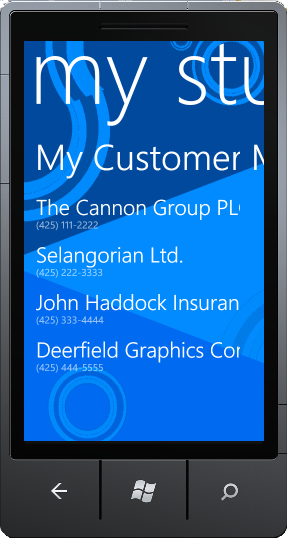
If you haven’t already read part 4 (and the prior parts) you should do so here, before continuing to read this post. In this post, I am going to create a small Windows Phone 7 application, which basically will be a phone version of the sidebar gadgets from this post. When we are done, your Windows Phone 7 will look like: During the other posts, I have been describing how to make the Proxy and one way of securing this....
-
Connecting to NAV Web Services from the Cloud–part 4 out of 5
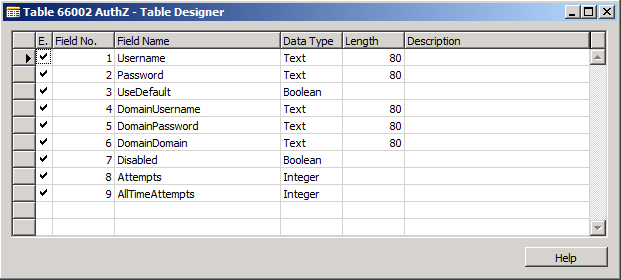
If you haven’t already read part 3 you should do so here, before continuing to read this post. By now you have seen how to create a WCF Service Proxy connected to NAV with an endpoint hosted on the Servicebus (Windows Azure AppFabric). By now, I haven’t written anything about security yet and the Proxy1 which is hosted on the Servicebus is available for everybody to connect to anonymously. In the real world, I cannot imagine a lot of scenarios...
-
Connecting to NAV Web Services from the Cloud–part 2 out of 5
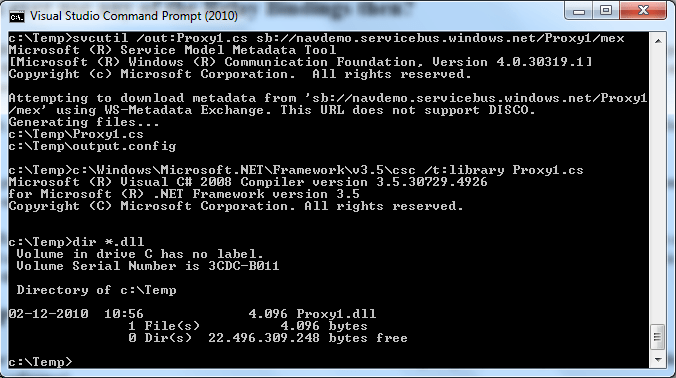
If you haven’t already read part 1 you should do so here, before continuing to read this post. In part 1 I showed how a service reference plus two lines of code: var client = new Proxy1.ProxyClassClient("NetTcpRelayBinding_IProxyClass"); Console.WriteLine(client.GetCustomerName("10000")); could extract data from my locally installed NAV from anywhere in the world. Let’s start by explaining what this does. The first line instantiates a WCF client class with a parameter pointing to a config section, which is used to describe bindings...