If you have been infected by Zombie containers, fear not – a cure is found.
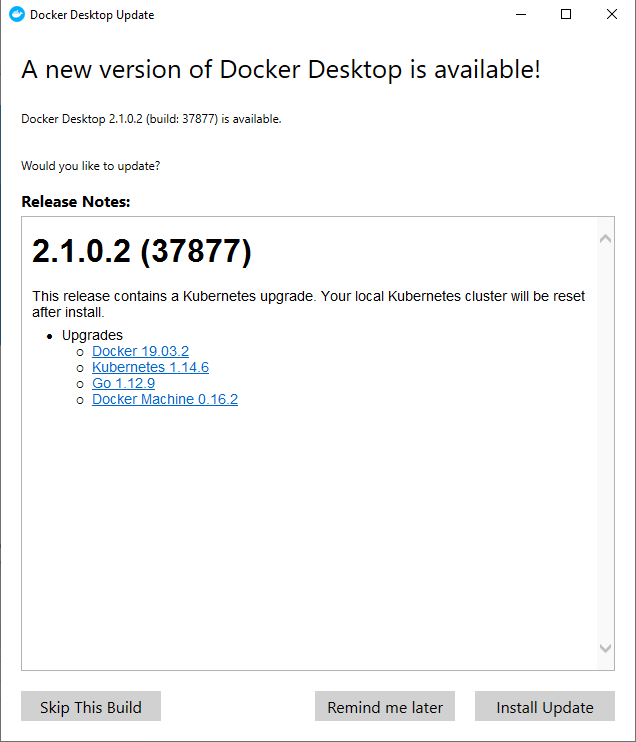
And it looks like this:
Right click the whale icon and search for updates…
Enjoy
Freddy Kristiansen
Technical Evangelist
3 archived comments
These comments were made on the previous (WordPress) version of this blog and are preserved read-only.
Use the comment section above to join the conversation.
MattSep 5, 2019
Small edit: “Right click the *whale*…”
MattSep 18, 2019
I just had two zombie containers today that I can’t stop even after a reboot and even after uninstalling/reinstalling. Docker for Windows in the later versions is too unstable to rely on for any length of time unfortunately.
freddykristiansenSep 18, 2019
If they where Zombie containers before – update, uninstall doesn’t fix anything. You have to apply the fix in the other blog post to get the containers to live again. On your other comment – the biggest problem (I think) is really that Windows 10 OS and docker are not moving in the same pace. When running docker on Windows Server OS’ – it seems very stable IMO.

3 archived comments
These comments were made on the previous (WordPress) version of this blog and are preserved read-only. Use the comment section above to join the conversation.
Small edit: “Right click the *whale*…”
I just had two zombie containers today that I can’t stop even after a reboot and even after uninstalling/reinstalling. Docker for Windows in the later versions is too unstable to rely on for any length of time unfortunately.
If they where Zombie containers before – update, uninstall doesn’t fix anything. You have to apply the fix in the other blog post to get the containers to live again. On your other comment – the biggest problem (I think) is really that Windows 10 OS and docker are not moving in the same pace. When running docker on Windows Server OS’ – it seems very stable IMO.