
The Fkh CLI (Freddy's Kubernetes Helper)
In my previous post I showed how to run backend commands from VS Code using Fkh - Freddy’s Kubernetes Helper. Obviously, VS Code is not the only frontend for Fkh, there is also a Web App and a CLI. Who knows, in the future, there might be other front-ends (MCP is one I have on my mind - for troubleshooting purposes).
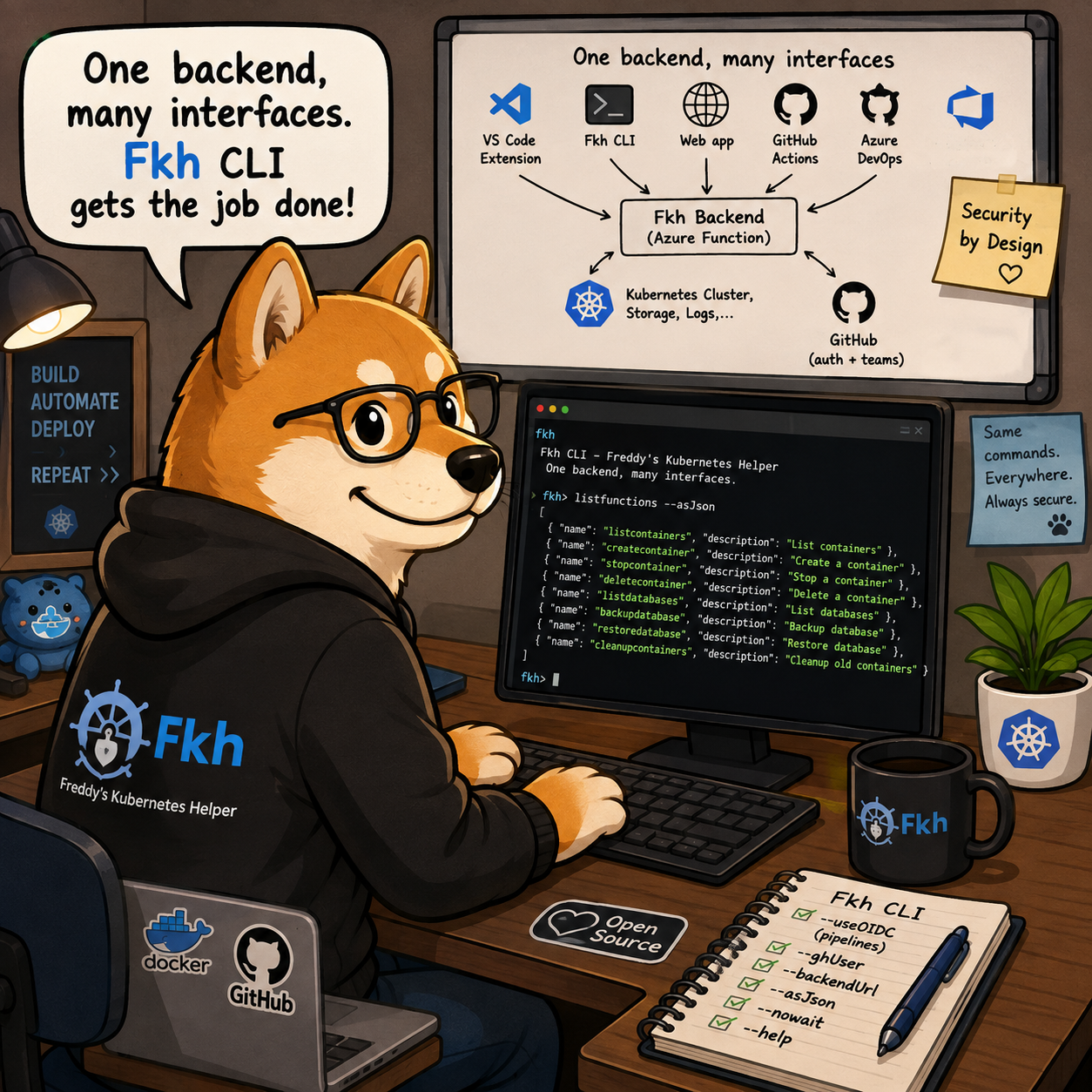
One backend, many interfaces
The most important thing to understand about Fkh is that all the functionality lives in the backend. The backend is an Azure Function running in your own Azure subscription - is the single place that authenticates you, authorizes you against your GitHub team memberships, and actually performs the work.
Everything else is just an interface to that backend:
- The VS Code extension is an interface.
- The CLI is an interface.
- The Web app is an interface.
GitHub Actions and Azure DevOps talks to the same interface typically using the CLI authenticating using federated credentials (OIDC).
graph LR
    subgraph Interfaces
        VSIX["VS Code Extension"]
        CLI["Fkh CLI"]
        WEB["Web app"]
        GA["GitHub Actions"]
        ADO["Azure DevOps"]
    end

    FUNC["Fkh Backend<br/>(Azure Function)"]
    FKH["Kubernetes Cluster,<br/>Storage, Logs,..."]
    GH["GitHub<br/>(auth + teams)"]

    VSIX --> FUNC
    CLI --> FUNC
    WEB --> FUNC
    GA --> CLI
    ADO --> CLI
    FUNC --> GH
    FUNC --> FKH
This is a deliberate design choice. Because the backend is the bearer of permissions, the interface you happen to use doesn’t matter for security - whether you create a container from VS Code, from the CLI, or from a pipeline, the exact same authentication, authorization and validation happens on the backend. The CLI cannot do anything the backend won’t allow.
Installing the CLI
The Fkh CLI is available on NuGet as a dotnet tool and is installed by using:
dotnet tool install|update --global fkh [--prerelease]
After installing the CLI, you need to specify backend and GitHub user account, and then you can get the function catalog by writing:
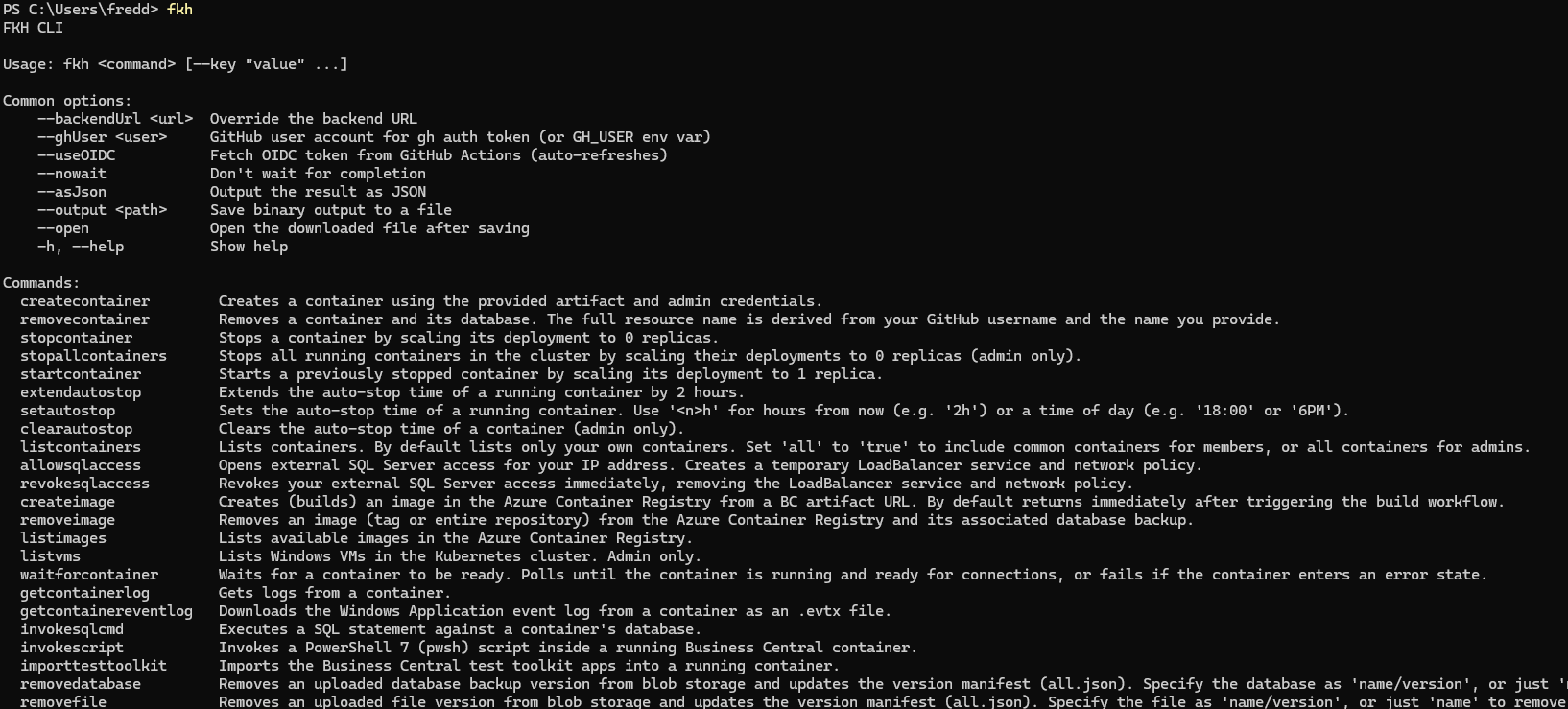
Note: many more functions are available and more functions will be added as needed by partners and customers using Fkh.
Over the coming weeks/months, I will desribe the functionality in Fkh in larger detail.
But, who needs a CLI?
If most people work in VS Code, why do we need a CLI at all?
As the matter of fact, most people probably won’t need to install the Fkh CLI. Admins might want to, but it isn’t a requirement for most things.
But, not everything is interactive. Pipelines, scheduled jobs, build agents and automation scripts don’t open VS Code and click buttons - they run commands. The CLI is built exactly for those scenarios:
- DevOps pipelines - spin up a container to run your tests, publish your apps, then tear it down again.
- Scheduled maintenance - clean up old containers, refresh databases, prune file versions.
- Scripting and glue - combine Fkh operations with everything else you do from a shell.
Because the CLI speaks the same backend as everything else, a container you create from a pipeline is a first-class citizen - you can see it and manage it from VS Code afterwards, and vice versa.
Authenticating from a pipeline
The one thing a pipeline needs is a way to prove who it is - and Fkh uses GitHub for that, just like it does for humans.
The pipeline needs the ID_TOKEN: write permission, which enables OIDC and in GitHub Actions you use OIDC with the --useOIDC option, which fetches a short-lived token from GitHub Actions and auto-refreshes it. There are no secrets to store - no personal access tokens, no passwords, nothing to rotate or leak.
# Inside a GitHub Actions job
fkh listcontainers --useOIDC --asJson
Outside of GitHub Actions - for example on a local machine or a self-hosted agent using the GitHub CLI - you can authenticate with your GitHub account using --ghUser <user> (or the GH_USER environment variable).
The common options you will reach for most often are:
--useOIDC- authenticate using the GitHub Actions OIDC token (pipelines).--ghUser <user>- GitHub user account for theghauth token (or theGH_USERenvironment variable).--backendUrl <url>- override the backend URL.--asJson- output the result as JSON so you can parse it in later steps.--nowait- don’t wait for completion, fire and continue.-h/--help- show help for any command.
The same commands, everywhere
Most of what you can do in the CLI is also available in VS Code through the Fkh: Run Command command. That gives you a menu of the available operations, and it invokes exactly the same backend operations the CLI does.
So the mental model is simple: there is one set of commands, and you pick the interface that fits the moment.
- Working interactively? Use the VS Code extension, or Fkh: Run Command for the less common operations.
- Automating? Use the CLI with
--useOIDCin your pipeline.
You don’t have to learn two different tools with two different capabilities - you learn the commands once, and you use them from wherever makes sense.
Wrapping up
The CLI is a small tool with a big idea behind it: Fkh is one backend, and the CLI is just one of its faces. Everything the CLI can do, the backend does, under the same security model as the VS Code extension - and most of it is available in VS Code too through Fkh: Run Command.
As always, take a look at the project on GitHub: https://github.com/Freddy-DK/Fkh and please consider sponsoring me or setting up a support service agreement to keep this project alive and thriving.
Enjoy
Freddy