
The Engineering Stairway to Heaven
The word “engineering” has been through quite a journey over the last few years. When I started out, engineering meant writing code - carefully, line by line, and I have spent 40+ years of my life doing that. Today, a big part of engineering is about telling an AI what to do, giving it the right context, building the machinery around it and orchestrating the whole thing.
I’ve been thinking about this as a kind of stairway - a set of steps, where each step builds on the one below it. You don’t throw away the previous step when you climb to the next one, you build on top of it. And the further up you go, the more you move from doing the work yourself to designing the system that does the work for you.
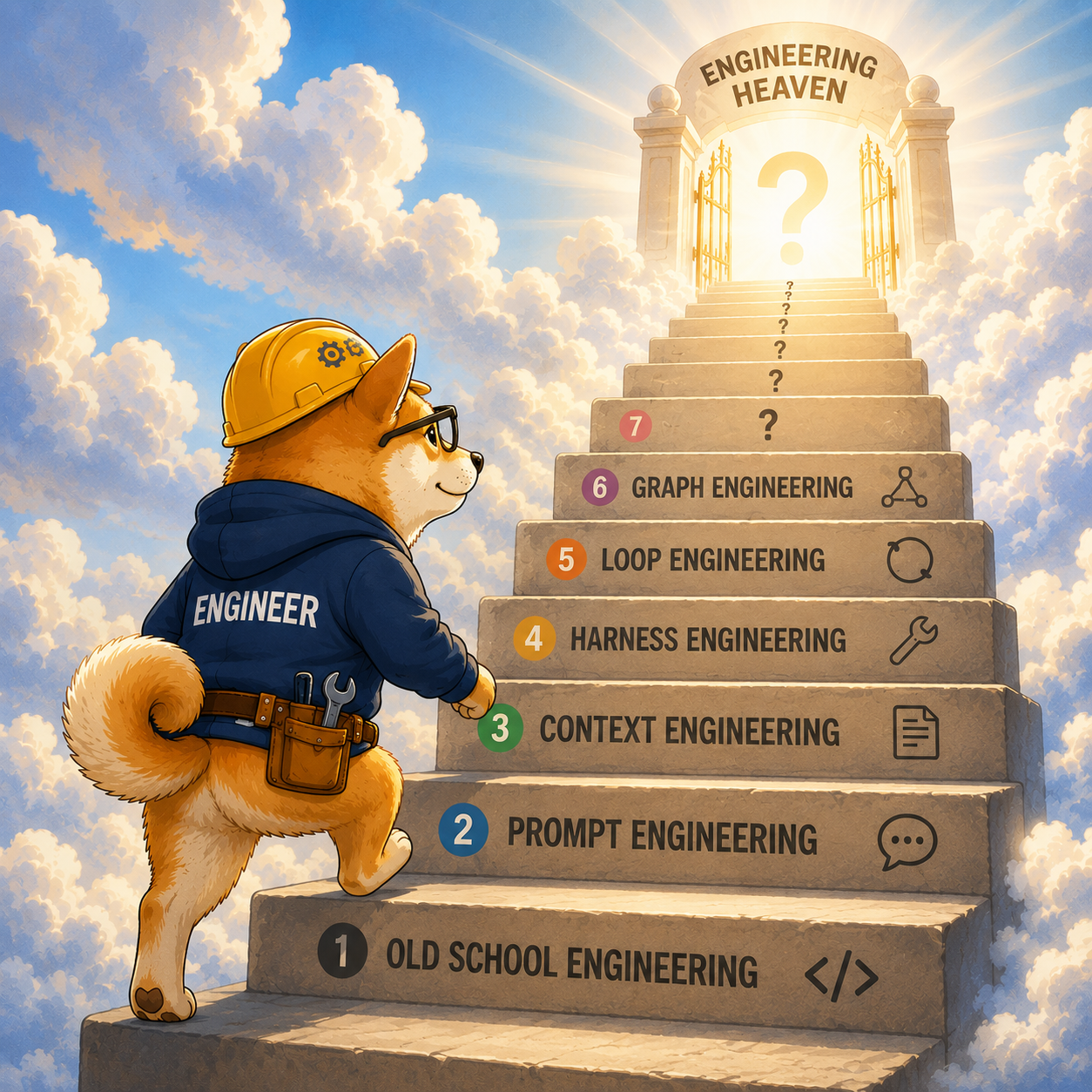
So let me try to walk up the stairway with you, step by step. For each step I’ll try to describe what it is, what you are doing and what the AI is doing - and then compare it to the step below.
Step 1 - Old school engineering
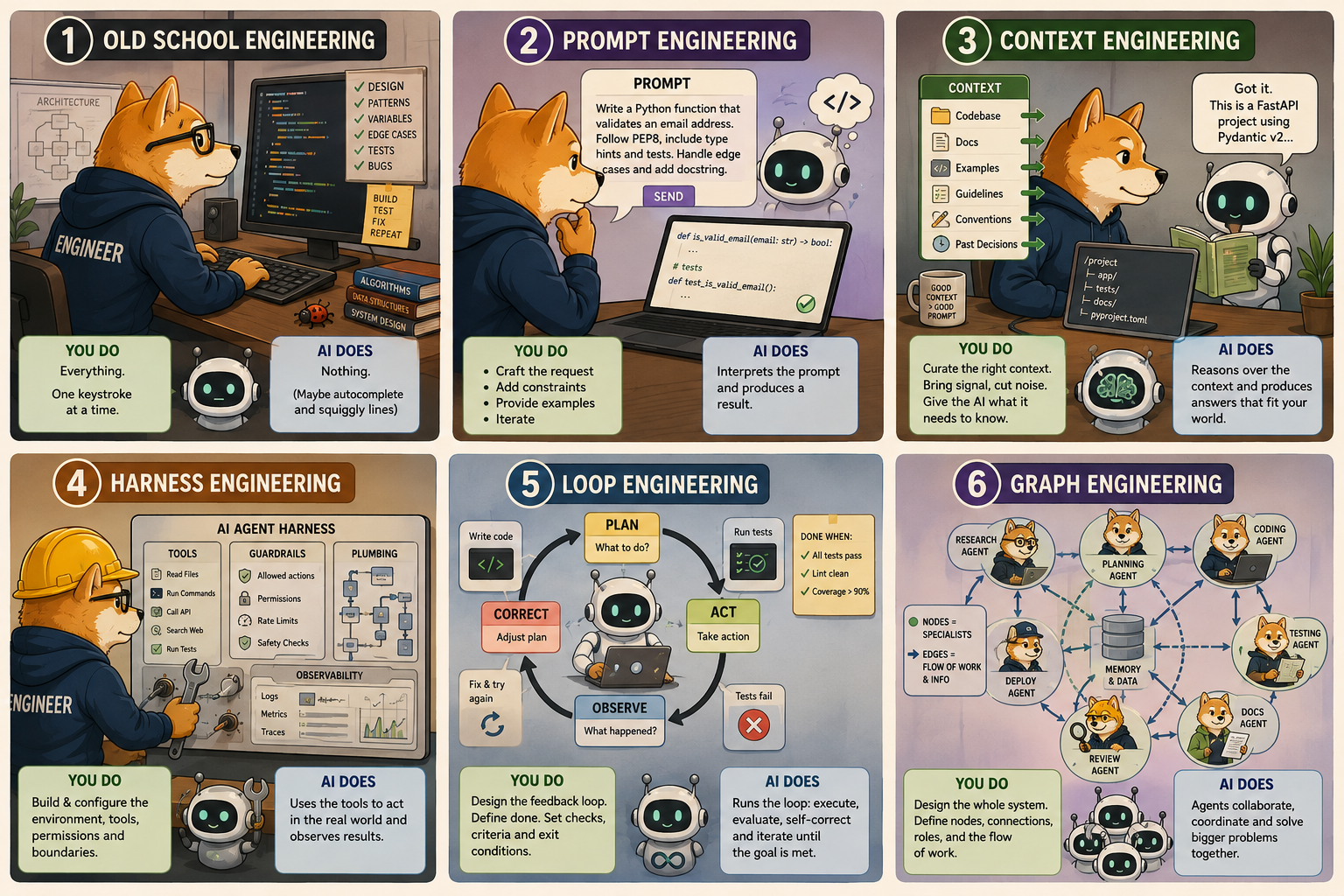
This is where we all come from. You sit down, you understand the problem, and you write the code. You design the architecture, you pick the patterns, you name the variables, you handle the edge cases, you write the tests and you fix the bugs.
- What you do: Everything. You are the one turning an idea into working software, one keystroke at a time.
- What the AI does: Nothing - or at most it gives you autocomplete and a squiggly line when you forget a semicolon.
Old school engineering is craftsmanship. It’s slow, it’s deep, and it gives you a complete understanding of every corner of your solution. The downside is obvious - it doesn’t scale with the amount of stuff we want to build today. But make no mistake - this is still the foundation. Everything above this step assumes that somebody, somewhere, understands what good code actually looks like.
Step 2 - Prompt engineering
The first step up the stairway is learning how to ask. Instead of writing the code yourself, you describe what you want and let the AI write it for you. It sounds trivial, but anyone who has tried knows that the quality of what you get back is directly tied to the quality of what you put in.
- What you do: You formulate the request. You choose the words, the constraints, the examples and the tone. You iterate on the prompt until the output is good enough.
- What the AI does: It interprets your prompt and produces a result - code, text, a plan, whatever you asked for.
Compared to old school engineering, you’ve handed over the typing, but you’ve taken on a new skill - the ability to express intent precisely. The trap here is thinking that a clever one-liner prompt is enough. It rarely is, and that’s exactly why the next step exists.
Step 3 - Context engineering
Prompting quickly runs into a wall - the AI simply doesn’t know enough about your world. It doesn’t know your codebase, your conventions, your customers or the decision you made three months ago and never wrote down. Context engineering is the art of feeding the AI the right information at the right time.
- What you do: You decide what the AI needs to know and make sure it gets it - relevant files, documentation, examples, coding guidelines, memory from previous conversations. You curate. You leave out the noise and bring in the signal.
- What the AI does: It reasons over the context you provided and produces a result that actually fits your situation instead of a generic answer.
Where prompt engineering is about the question, context engineering is about the knowledge behind the question. This is where a lot of the real magic happens today - a mediocre prompt with great context beats a great prompt with no context almost every time.
Step 4 - Harness engineering
Once you’ve got prompting and context under control, you realize the AI is much more powerful when it can actually do things - read files, run commands, call APIs, search the web, execute tests. The harness is the machinery around the model - the tools, the guardrails, the permissions and the plumbing that turn a chat box into an agent that can act.
- What you do: You build and configure the environment. You decide which tools the AI has access to, what it’s allowed to do, where the boundaries are and how results flow back in. You design for safety and for capability at the same time.
- What the AI does: It uses the tools you gave it to take actions in the real world, observe the results and adjust.
Compared to context engineering, you’re no longer just feeding information in - you’re giving the AI hands and letting it interact with its environment. This is a big jump, because now the AI can create side effects, and that means the quality of your harness directly determines how much you can trust it to run on its own.
Step 5 - Loop engineering
A single request-and-response is nice, but the really interesting things happen when the AI can work in a loop - try something, check the result, learn from it and try again - until the goal is reached. Loop engineering is about designing that cycle. Plan, act, observe, correct, repeat.
- What you do: You design the feedback loop. You define what “done” looks like, what success and failure mean, how the AI should evaluate its own work and when it should stop. You build the checks and the exit conditions.
- What the AI does: It runs the loop - executing, evaluating, self-correcting and iterating toward the goal, often across many steps, without you in the driver’s seat for every single one.
The difference from harness engineering is autonomy over time. A harness gives the AI hands; a loop gives it persistence. This is where you stop babysitting every action and start trusting the system to grind through a problem on its own - which of course only works if the loop is designed well enough to catch its own mistakes.
Step 6 - Graph engineering
At the top of the stairway, a single agent in a single loop is no longer enough. Real problems have many parts, and the most powerful systems are made up of many agents, tools and loops wired together into a graph - specialists that hand work off to each other, run in parallel, and combine their results. Some people call this workflow or orchestration engineering, but I like the picture of a graph.
- What you do: You design the whole system. You decide what the nodes are, how they connect, who does what, how work flows and where the decisions are made. You architect the collaboration between many moving parts.
- What the AI does: The agents in the graph carry out their specialized roles, coordinate, pass information along the edges and collectively solve a problem far bigger than any single one of them could handle alone.
Compared to loop engineering, you’ve gone from designing one loop to designing an entire organization of loops. You’ve moved almost completely out of the code and into the architecture. Interestingly, this feels a lot like old school system design again - you’re back to thinking about components, boundaries and responsibilities, except now the components are intelligent.
Are there more steps?
Almost certainly. This stairway isn’t finished, and I don’t think it ever will be. People are already talking about evaluation engineering (how do you systematically measure whether any of this actually works?), memory engineering (how do systems remember and learn across time?) and environment engineering (how do you build the sandbox the agents live in?). New steps will keep appearing as fast as we can name them.
And if you look closely, you’ll notice something funny about the whole stairway - the higher you climb, the more it starts to look like classic engineering again. At the top you’re doing architecture, system design and orchestration - just with a very different kind of building block. The fundamentals never went away. They just changed clothes.
But what about vibe coding?
You might be wondering where “vibe coding” fits on this stairway. And the honest answer is - it doesn’t really get its own step. Vibe coding is what happens when you climb onto the prompt step, let go of the handrail and stop looking down. You describe what you want, you accept whatever the AI hands back, you run it, and if it feels right you move on - without ever really reading or understanding the code underneath.
And this is where I can’t help thinking about the old fairy tale from H.C. Andersen about the Emperor’s New Clothes.

You remember the story. Two swindlers promise the emperor the finest suit imaginable - a fabric so special that it is invisible to anyone who is stupid or unfit for their job. Of course there is no fabric at all, but nobody dares to say so. The ministers admire it, the emperor parades through town in it, and the whole crowd cheers at the magnificent clothes - because nobody wants to be the one who can’t see what everybody else is pretending to see. It takes a small child to shout out that the emperor isn’t wearing anything at all.
Vibe coding can feel a lot like that parade. The demo runs, the screen looks great, everybody nods and says how amazing it is - and for a while nobody wants to be the one asking “but has anyone actually looked at the code?” It all works beautifully right up until a little child - or a security review, or a production incident, or the customer’s data - points out that there was never really anything holding it together.
Now, I’m not saying vibe coding is useless. Far from it. For a prototype, a demo or a throwaway experiment it is fantastic, and it can get you to “wow” faster than anything we’ve ever had. The danger is only when we forget that we’re vibing - when we let the cheering crowd convince us that the emperor is fully dressed and ship it straight to production. The bottom step of the stairway, actually knowing what good code looks like, is the child in the crowd. Keep that voice around, and vibe coding becomes a superpower instead of a very well-attended parade.
Vibe coding with guardrails
Here’s the interesting part though - the industry noticed the missing handrail too, and a whole category of tools has appeared to put it back. Tools like Lovable, Bolt, v0, Replit and others let you vibe your way to a working application - but with guardrails baked into the experience.
What makes these tools so fascinating is that they don’t just spit out code and leave you to figure out the rest. They wrap the whole thing in structure. They scaffold a sensible project, wire up a database, handle authentication, deploy it somewhere, keep the pieces consistent and gently steer you away from the worst mistakes. With Lovable in particular, it almost feels like you have an architect sitting next to you while you build - one who quietly takes care of the plumbing, the conventions and the structure, so you can stay focused on describing what you actually want.
Vibe-coding platforms like this are a little like the flying trunk in Hans Christian Andersen’s tale. You climb in, say where you want to go, and suddenly you can travel farther and faster than your own abilities would normally allow. The magic is real — the trunk really does fly. But you didn’t build it, and you don’t entirely know how it works. As long as the trunk keeps flying, that hardly matters. The interesting question comes when it doesn’t.

In stairway terms, this is clever - these tools take the prompt step, and instead of removing the handrail, they build the handrail into the product. The context, the harness and quite a bit of the loop are all handled for you, under the hood, by the tool itself. You get the speed and the joy of vibe coding, but a lot of the engineering rigor that vibe coding usually throws away is quietly being done on your behalf.
In fact, it almost feels less like a stairway and more like an escalator. You step on at the bottom, and the tool carries you up past prompt, context, harness and loop without you having to climb each step yourself. It’s a wonderful ride - just remember that an escalator only goes where it was built to go, and if it ever breaks down, the only way to keep climbing is to know how to walk the steps on your own.
It’s a genuinely powerful place to be. You can go from an idea to a running, deployed app in an afternoon, and the result is far more solid than what raw vibe coding would give you. But I’d still add one small note of caution - the architect is real, but it’s an architect you can’t see. The guardrails are there, but they were designed by someone else, for the general case, not for your specific problem. That’s absolutely fine for a huge number of applications - just remember that when the day comes where you need to understand exactly what your system does and why, the bottom step of the stairway is still waiting for you.
What about Business Central?
This is where it gets personal for me, because I can’t talk about a stairway like this without looking at the world I come from - Business Central.
If I’m completely honest, our current toolset is struggling to keep up with the pace of this stairway. The rest of the industry is stepping onto escalators - vibing full applications into existence, with context, harness and loop handled for them - while we in the AL world are still doing a lot of the climbing by hand. The tooling, the AI support, the context that models have about AL and Business Central, the harnesses and the agents - all of it is trailing behind what developers on mainstream stacks now take for granted. That gap is real, and it isn’t shrinking on its own.
So we need to get our act together. We need to collaborate - across partners, across Microsoft, across the community - to build the context, the tooling and the agents that bring AL and Business Central up onto the same steps everybody else is climbing. If we each try to solve this alone, in our own little corner, it’s not innovation, it’s waste.
Please Note: I will do my utmost to ensure that we have sessions covering all of these aspects at Directions EMEA 2026 in Paris!
Where are you on the stairway?
So here’s my question to you, and I genuinely want to know.
Where are you on the engineering stairway to heaven?
- Are you still happily writing every line yourself, and proud of it?
- Have you learned to prompt, but not yet cracked context?
- Are you feeding your agents rich context and building harnesses around them?
- Are you designing loops and letting things run on their own?
- Or are you already wiring up graphs of agents and orchestrating the whole show?
There’s no shame in being on any particular step - we’re all climbing at our own pace, and honestly nobody has reached the top, because there isn’t one. What matters is that you keep climbing, and that you never forget that the bottom step - actually knowing what good software looks like - is what holds the whole staircase up.
Drop a comment and let me know which step you’re standing on. I’m curious to see where this community is.
Enjoy
/Freddy