Web Services
-
Connecting to NAV Web Services from PHP- take 2
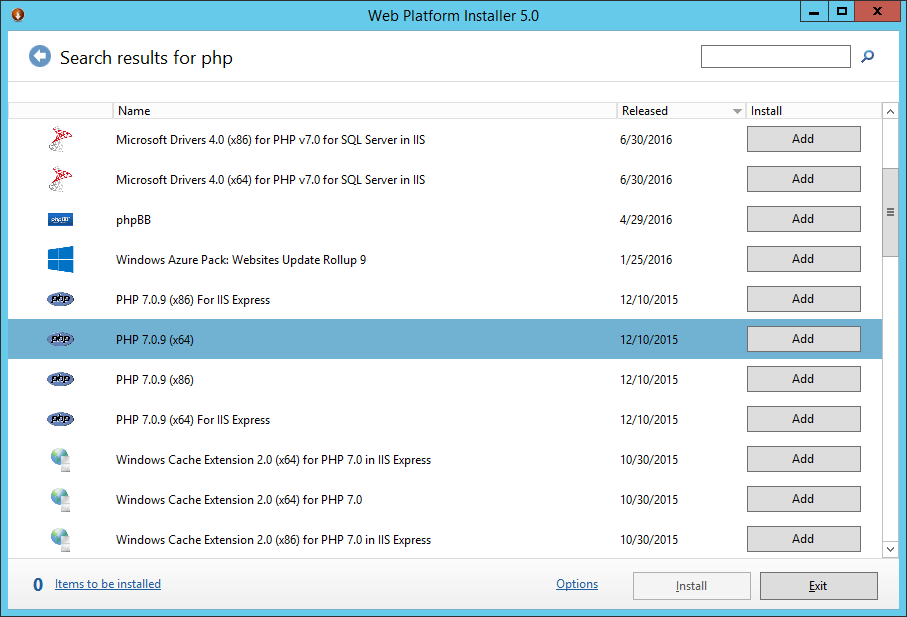
Back in the days – January 19th 2010 to be exact, I wrote a blog post on how to connect to NAV Web Services from PHP here. Web Services was fairly new and there wasn’t a lot of info out there on how to do things. The “old” blog post has been read over 76.000 times (yes, seventy six thousand times) and I have received numerous comments and emails on whether this works with NAV 2016 and how you would...
-
Connecting to NAV Web Services from the Cloud–part 5 out of 5
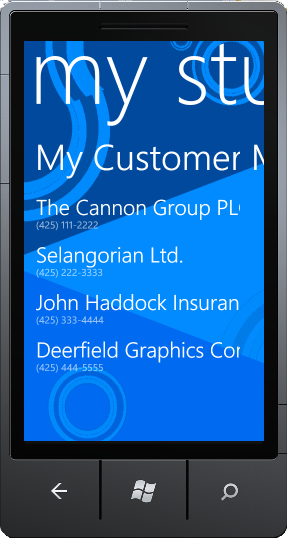
If you haven’t already read part 4 (and the prior parts) you should do so here, before continuing to read this post. In this post, I am going to create a small Windows Phone 7 application, which basically will be a phone version of the sidebar gadgets from this post. When we are done, your Windows Phone 7 will look like: During the other posts, I have been describing how to make the Proxy and one way of securing this....
-
Connecting to NAV Web Services from the Cloud–part 4 out of 5
If you haven’t already read part 3 you should do so here, before continuing to read this post. By now you have seen how to create a WCF Service Proxy connected to NAV with an endpoint hosted on the Servicebus (Windows Azure AppFabric). By now, I haven’t written anything about security yet and the Proxy1 which is hosted on the Servicebus is available for everybody to connect to anonymously. In the real world, I cannot imagine a lot of scenarios...
-
Connecting to NAV Web Services from the Cloud–part 3 out of 5
If you haven’t already read part 2 you should do so here, before continuing to read this post. In part 2 I talked about how to connect to my locally installed NAV Web Service Proxy from anywhere in the world and towards the end, I promised that I would explain how the proxy was build. Problem was, that while writing this post I ran into a bug in the Servicebus – which was really annoying. The bug causes my service...
-
Connecting to NAV Web Services from the Cloud–part 2 out of 5
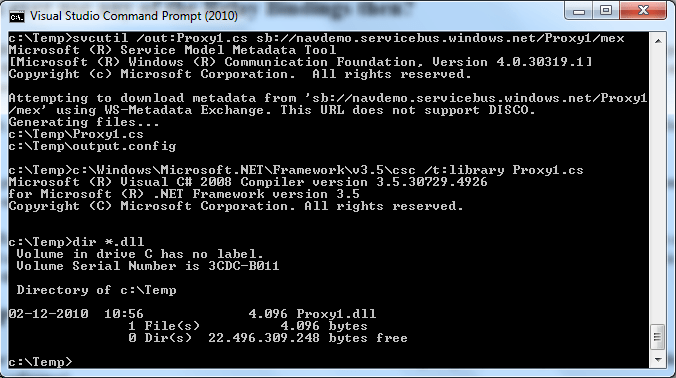
If you haven’t already read part 1 you should do so here, before continuing to read this post. In part 1 I showed how a service reference plus two lines of code: var client = new Proxy1.ProxyClassClient("NetTcpRelayBinding_IProxyClass"); Console.WriteLine(client.GetCustomerName("10000")); could extract data from my locally installed NAV from anywhere in the world. Let’s start by explaining what this does. The first line instantiates a WCF client class with a parameter pointing to a config section, which is used to describe bindings...
-
Connecting to NAV Web Services from the Cloud–Part 1 out of 5
My last post in January 2010 (here) talked about how to create a Proxy for connecting to NAV Web Services from outside the local intranet, by creating a local proxy and exposing this through the firewall to your DMZ. It still isn’t simple though and there are a lot of tasks to complete in order to make this work: Define the API which you need to expose to the external application – and create the internal proxy Decide what authentication...
-
Web Services Infrastructure and how to Create an Internal Proxy
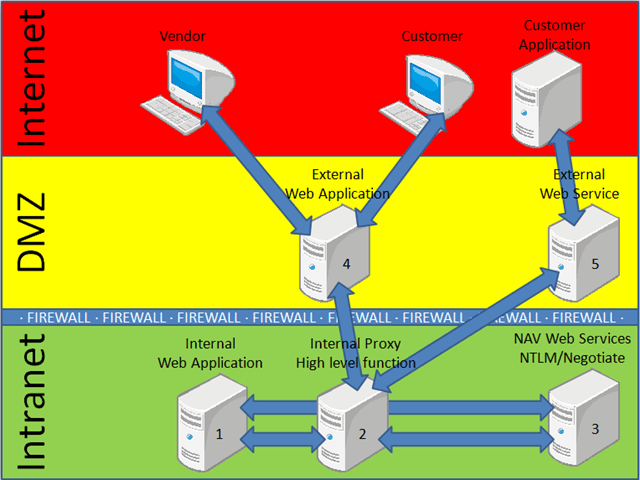
I am NOT an expert in how to setup a secure network and I do NOT know a lot about firewalls, DMZ setup and all of these things, but I have seen a lot in my 25 years of working with computers and the following (absolutely non-exhaustive) gives a good picture of a common network situation of companies, who wants to interact with customers and partners through Web Applications and/or Web Services. DMZ can be at the customer site or...
-
Connecting to NAV Web Services from VBScript
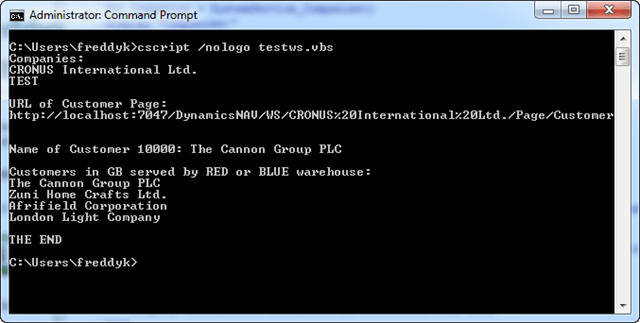
The Connecting to NAV Web Services series is coming to an end. I think I have covered the majority of platforms from which you would like to connect and use NAV Web Services – some things are easy and some things are a little harder. I did not cover Flash nor did i cover things like the iPhone or iPod Touch, primarily because I don’t think the demand is there. If I have forgotten any platform/language please let me know...
-
Connecting to NAV Web Services from Silverlight 3
Please read this post to get a brief explanation of the scenario I will implement in Silverlight. Yes, yes – I know it isn’t a fancy graphical whatever as Silverlight should be, but to be honest – I would rather do something crappy on purpose than trying to do something fancy and everybody would find it crappy anyway:-) Getting started with Silverlight http://silverlight.net/getstarted – is your friend. Go to the web site and click this button: Or click the image...
-
Connecting to NAV Web Services from Windows Mobile 6.5
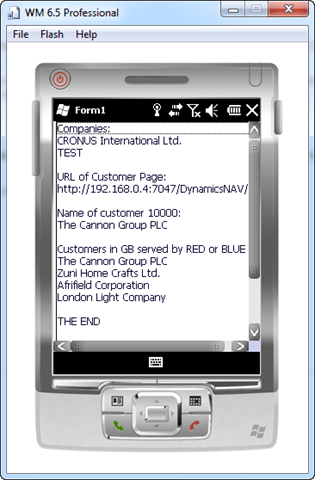
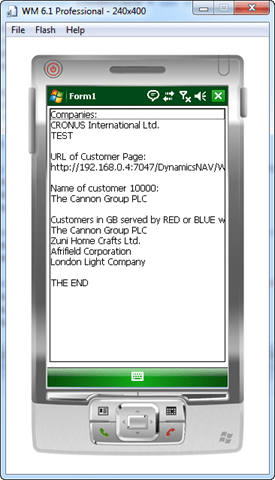
It is kind of embarrassing that I write a post about how to connect to NAV Web Services from Windows Mobile 6, when Windows Mobile 6.5 has been out for almost half a year (that’s how much a gadget person I am:-)) I just downloaded the 6.5 SDK from here and tried out the exact same application as I wrote for Windows Mobile 6 in this post and everything seems to work just fine, so please follow the steps in...
-
Connecting to NAV Web Services from Windows Mobile 6
I have created my very first Windows Mobile App! This is running in an Emulator using the Professional SDK. I also tried to deploy the solution to my physical device (my Smartphone), which also worked: To be honest, the biggest challenge is to setup everything so that you can get going. A couple of useful links to get going Location to download Windows Mobile 6 SDK: http://www.microsoft.com/downloads/details.aspx?FamilyID=06111a3a-a651-4745-88ef-3d48091a390b&DisplayLang=en The Windows Mobile 6 SDK is not included in Visual Studio 2008, you...
-
Connecting to NAV Web Services from Microsoft Dynamics NAV 2009 SP1
Please read this post to get a brief explanation of the scenario I will implement in Microsoft Dynamics NAV 2009 SP1. Please also read this post in order to understand how Web Services works using pure XML and no fancy objects. Like Javascript, NAV 2009 SP1 does not natively have support for consuming Web Services. It does however have support for both Client and Server side COM automation and XmlHttp (which is compatible with XmlHttpRequest which we used in the...
-
Logging the XML generated from .net or received from NAV WS
When working with Web Services using languages who doesn’t natively have Web Services support (like Javascript and NAV self) you have to create a SOAP envelope yourself in the correct format. Of course you can do so by looking at the WSDL, understanding SOAP and using theory – or… – you can create a small C# application, invoke the Web Service you want to and see what XML .net creates for this. You can also see what XML you get...
-
Connecting to NAV Web Services from Javascript
Prerequisites Please read this post to get a brief explanation of the scenario I will implement in Javascript. BTW. Basic knowledge about Javascript and XML is required to understand the following post:-) Browser compatibility The sample in this post will work with Internet Explorer. I have only tried this with IE8, but according to documentation it should work from IE5 and up. I actually also tried to download Mozilla FireFox 3.6 and Opera 10.10 – but I failed to make...
-
Connecting to NAV Web Services from Visual Basic .net using Service Reference
This post is really just a Visual Basic version of this post and this post combined, please read those posts before continuing this post. As described in the other posts, there are two ways to work with Service References – one is to keep the configuration in a .config file and the other is to do everything from code. Using the .config file First I create a Visual Basic Console application and add the two service references as explained in...
-
Connecting to NAV Web Services from Visual Basic .net using Web Reference
This post is really just a Visual Basic version of this post, please read that post before continuing. Note, this is my very first Visual Basic application. I don’t think there are any ways to do this easier – but then again – how should I know. I am creating a Visual Basic Console application and adding two Web References (like it is done in this post) and then it is really just writing the code The code Module Module1...
-
Connecting to NAV Web Services from C# using Service Reference (code version)
You should read the post about connecting to NAV Web Services from C# using Service Reference (config file version) before continuing here. Code is king As you saw in the other post, the config file was pretty complicated and although it is editable by hand and as such could be modified at installtime or whatever, I actually prefer to capture a number of these settings in code and only have very specific values in a config file (like f.ex. the...
-
Connecting to NAV Web Services from C# using Service Reference (config file version)
Prerequisites Please read this post to get a brief explanation of the scenario I will implement in C# using Web References. For C# we can leave the Service Tier running Negotiate or we can use Ntlm as PHP and Java. In this example I will assume that the Service Tier is running SPNEGO (which is the default) BTW. Basic knowledge about C# is required to understand the following post:-) Version and download I am using Visual Studio 2008 professional with...
-
Connecting to NAV Web Services from C# using Web Reference
Prerequisites Please read this post to get a brief explanation of the scenario I will implement in C# using Web References. For C# we can leave the Service Tier running Negotiate or we can use Ntlm as PHP and Java. In this example I will assume that the Service Tier is running SPNEGO (which is the default) BTW. Basic knowledge about C# is required to understand the following post:-) Version and download I am using Visual Studio 2008 professional with...
-
Connecting to NAV Web Services from Java
Prerequisites Please read this post to get an explanation on how to modify the service tier to use NTLM authentication and for a brief explanation of the scenario I will implement in Java. BTW. Basic knowledge about Java is required to understand the following post:-) Version and download Java does not natively have support for the SPNEGO authentication protocol, but it does have support for NTLM authentication, so you will have to change the Web Services listener to use that....
-
Connecting to NAV Web Services from PHP
Prerequisites Please read this post to get an explanation on how to modify the service tier to use NTLM authentication and for a brief explanation of the scenario I will implement in PHP. BTW. Basic knowledge about PHP is required to understand the following post:-) Version and download In my sample I am using PHP version 5.2.11, which I downloaded from http://www.php.net, but it should work with any version after that. In order to make this work you need to...
-
Connecting to NAV Web Services from …
I promised to write some posts about how to connect to NAV Web Services from various other programming languages/platforms and I guess it is about time I kept my promise. I will create a couple of posts on how to connect to NAV Web Services from: PHP Java C# using Web Reference C# using Service Reference Javascript Visual Basic using Web Reference Visual Basic using Service Reference Windows Mobile Microsoft Dynamics NAV 2009SP1 and more… Scenario For all these I...
-
Edit In Excel R2 – Part 2 (out of 2) – the final pieces
It is time to collect the pieces. The full Edit In Excel R2 solution looks like this Slightly more complicated than the first version – but let me try to explain the pieces NAVEditInExcel is the COM object, which we use from within NAV. This actually hasn’t changed a lot, the only small change is, that the EditInExcel method now takes a base URL, a company, a page and a view (compared to just a page and a view earlier)....
-
Auto Deployment of Client Side Components – take 2
Updated the link to the ComponentHelper msi on 12/11/2009 Please read my first post about auto deployment of Client side components here before reading this. As you know, my first auto deployment project contained a couple of methods for automatically adding actions to pages, but as one of my colleagues in Germany (Carsten Scholling) told me, it would also need to be able to add fields to tables programmatically in order to be really useful. In fact, he didn’t just...
-
Dynamic references to NAV Page Web Services in C# – take 2
In this post from April, I explained how to make dynamic references to page based Web Services, but the post really left the developer with a lot of manual work to do using reflection. So – I thought – why not create a couple of helper classes which makes it easier. Basically I have created a generic NAVPageServiceHelper class, which encapsulates all the heavy lifting of reflection and leaves the developer with a set of higher level classes he can...
-
What COMPANY to use?
As you know, when creating an application consuming NAV Web Services you need to specify the Company name as part of the URL to the Web Service, but what company should you be using? Some applications are web front-ends placing data from the web application into NAV. For applications like this you typically would have a config file in which you specify what company things needs to go to. For these applications, this post adds no further value. Other applications...
-
Extending page Web Services (and creating a Sales Order again)
It has been working in the same way since NAV 2009, but I still get asked often how this works, so why not write up a quick post on this. I also realize that my prior post on how to create Sales Orders through Web Services was made very complex due to compatibility with NAV 2009. This post only works in NAV 2009 SP1 and will show how to extend the Order page with a Post function and show how...
-
Synchronize A/D users to NAV
During my work with demos like Edit In Excel, I wanted to make sure that these things would work in all localized versions of NAV 2009 SP1 – meaning that I needed to install 14 different databases and 14 running Service Tier’s. Having done that, I also wanted to allow my colleagues who needed to check something, access to these service tiers. For a geek (like me:-)), that problem looks like something you need to write an application for, even...
-
Auto deployment of Client Side Components
NOTE: There is an updated post on Auto deployment of Client Side Components here. When you install the RoleTailored Client on a number of clients, you might need to install a number of Client side components as well. This might not sound as too much of a problem when you need to install the client anyway – but lets say you install an ISV Add-on with a live customer, who already have 100 clients install – and now you need...
-
Multiple Service Tiers – SP1
Right around the release of Microsoft Dynamics NAV 2009, I wrote a blog entry with some .bat files on how to create multiple Service Tiers when working with NAV 2009. The blog post is here: http://blogs.msdn.com/freddyk/archive/2008/10/29/multiple-service-tiers.aspx Now NAV 2009 SP1 is about to be released, it is time for a small update. One of the files of the package is a CustomSettings.template file, which really is just the CustomSettings.config with a few values replaced with variable names, so that we...
-
Handling Sales Orders from Page based Web Services – in NAV 2009SP1 (and RTM)
First of all, there isn’t going to be a new post on every single record type on how to handle them from Web Services – but Sales Orders are special and the reason for the “(and SP1)” in the titel refers to the fact, that there are changes between RTM and SP1 or maybe a better way to state it is, that the way you could do it in RTM (that might lead to errors) is no longer possible –...
-
Web Services changes in NAV 2009 SP1
NAV 2009 SP1 is being released later this year, so why write about it now? The main reason is, that NAV 2009 SP1 comes out with a couple of changes, you might want to take into consideration when writing towards NAV 2009 Web Services. Except for some performance enhancements, the major changes are: New standard encoding of the Company name I think one of the questions that has been asked the most is, how does my company name look in...
-
Installing NAV 2009 without A/D
The majority of installations of NAV 2009 will be in a network environment, you will have a domain server and an Active Directory with your users and your biggest worries will be how to setup a 3T environment on 3 different boxes, getting the delegation setup correctly all of that stuff. But in a few cases we might run into situations, where there is only a LAN between a number of machines and no server. In this post I will...
-
Dynamic references to NAV Page Web Services in C#
Note: There is an updated post about Dynamic references to NAV Page Web Services here. When creating the very first (never published) version of Edit In Excel, it was loosely coupled, meaning that I did not have any Web references in the project to the Customer Page, Vendor Page or other pages. I read the WSDL and used XPath to traverse the XML and build up structures and I was able to attach to any Page Web Service. The code...
-
Using LINQ with NAV Web Services
In .NET 3.5 Microsoft released LINQ (Language INtegrated Query) – which is a way of writing select statements strongly typed inside your C# code. Wouldn’t it be nice if we could leverage this technology when connecting to NAV Web Services? I thought YES – so I set out to find out what it took… The goal was to be able to replace code like this: CustomerRef.Customer_Service cservice = new CustomerRef.Customer_Service(); cservice.UseDefaultCredentials = true; CustomerRef.Customer_Filter filter = new CustomerRef.Customer_Filter(); filter.Field =...
-
Bugsy’s blog is alive
I just received the information, that Bugsy’s blog (http://blogs.msdn.com/pchriste) is alive and the first post in that one looks really cool. Showing NAV Data in Sharepoint using Business Data Catalogue. using Web Service in NAV 2009. I know what I am going to play with tonight:-) _Freddy Kristiansen _PM Architect Microsoft Dynamics NAV
-
Edit In Excel R2 – Part 1 (out of 2)
This post assumes that you have read the 4 step walkthrough of how to build the Edit In Excel demo from November 2008. You can find the parts here: Part 1, Part 2, Part 3, Part 4 and the Bug Fix. In this post I will talk about what is needed in order to be able to save an Excel spreadsheet on a local disc, edit it offline and then submit your changes later. My first assumption was that this...
-
Edit In Excel – bug fix and R2
If you haven’t read the 4 step walkthrough of how to Edit In Excel from Microsoft Dynamics NAV, you should do so here this post is a follow up to the original posts. I have received a number of suggestions to what you could do with the Edit In Excel and a single bug. In this post I will fix the bug and I will explain what R2 is all about. The Bug The bug description is, that if you...
-
Integration to Virtual Earth – Part 3 (out of 4)
If you haven’t read Part 1 and Part 2, you should do so before continuing here. In Part 1 we saw how to add geographical information to your customer table and how to connect to the Virtual Earth geocode web service, and in part 2 we created a simple web site showing a map and adding pushpins. Now we want to add an action to the customer card, showing us the location of the customer and other customers in the...
-
Integration to Virtual Earth – Part 2 (out of 4)
If you haven’t read Part 1, you should do so before continuing here. In Part 1 we saw how to add geographical information to your customer table and how to connect to the Virtual Earth geocode web service. Now we want to put this information to play. First of all, we all know Virtual Earth (if not – try it at http://maps.live.com). Less commonly known is it, that the map control used in maps.live.com actually is available for public usage...
-
Microsoft Windows Vista Gadget – My “Stuff”
This is my second gadget. My first gadget was the Search gadget, which you can find here. I won’t repeat any explanation as to what a gadget is, nor will I talk about Javascript – instead I will focus upon the things, which are new in this post: Returning an XMLPort from Web Services to Javascript Running a Web Service method asynchronous Use the same gadget for invoking three different methods Poor mans error handling in Javascript What I want...
-
Search in NAV 2009 – Part 3 (out of 3)
If you haven’t read part 2 and part 1 of the Search in NAV 2009 posts, you should do so before continuing. This is the 3rd and final part of the Search in NAV 2009 post. In this section I will show how to create a Windows Vista Gadget and have this gadget connect to NAV through Web Services and search in NAV (like the System Tray version in part 2). We will create an installable Gadget like: and when...
-
Search in NAV 2009 – Part 2 (out of 3)
If you haven’t read part 1 of the Search in NAV 2009, you should do so before continuing. In this section we will create a small Winforms application, which uses the Web Service we just created in part 1. Our application will be visible as a System Tray Icon, it will have a global Windows Hotkey with which we can activate search and when you activate the Search application it will popup and look like this In part 3 we...
-
Search in NAV 2009 – Part 1 (out of 3)
During the partner keynote and during a couple of the other presentations, we showed a small application, which was able to search in NAV 2009 through multiple tables, display a result set and allow people to drill into task pages in NAV 2009 from the search result window. During the next 3 posts, I will explain how this demo is done and make it available for download. The sample comes with absolutely no warranty, but you can download it and...
-
NAV 2009 and Unicode!
The title might be a bit misleading, but I am writing this post as a response to a problem, which a partner ran into with NAV 2009 – and the problem is caused by Unicode. I am not a Unicode expert, so bare with me if I am naming some things wrong. As you know, NAV 2009 is a 3T architecture and the Service Tier is 95% managed code (only the lower pieces of the data stack is still unmanaged...
-
Edit In Excel – Part 4 (out of 4)
If you haven’t read part 3, part 2 (and part 1), you should do so before continuing here. We have seen how to put code inside Excel, using VSTO and connect to NAV 2009 Web Services. We have seen how to add this to a table inside Excel and how to write data back to NAV through Web Services. We can delete, add and modify records in Excel and we can even do so with both Customers, Vendors and Items....
-
Edit In Excel – Part 3 (out of 4)
If you haven’t read part 2 (and part 1), you should do so before continuing here. In Part 1 and 2, we have seen how easy it is to add a Web Service Reference inside Excel, and use it to get Data. In Part 2 we even had the ability to modify data and send this back to NAV. The original intend was that part 3 would be all about integrating this to NAV on the Client side and part...
-
Edit In Excel – Part 2 (out of 4)
If you haven’t read Part 1, you should do so before continuing here. In Part 1 we saw how easy it is to white .net code inside Excel, and get it executed based on an event in Excel, and how easy it is to fill values into cells. But in order to make this really useful we need to go a different way around. First of all, we need to know more about the record we are working with. We...
-
Edit In Excel – Part 1 (out of 4)
For the last 6-9 months, Microsoft have been showing a demo of how a user could create a filter on a list place and invoke an action called Edit In Excel. This would open Microsoft Excel with the same records, the user selected in the List Place and allow the user to edit values and post modifications back to Microsoft Dynamics NAV, showing how the user would get a runtime error if he was trying to violate validation logic from...
-
Transferring binary data to/from WebServices (and to/from COM (Automation) objects)
A number of people have asked for guidance on how to transfer data to/from COM and WebServices in NAV 2009. In the following I will go through how to get and set a picture on an item in NAV through a Web Service Connection. During this scenario we will run into a number of obstacles – and I will describe how to get around these. First of all – we want to create a Codeunit, which needs to be exposed...
-
The Service Tier
My first technical blog post is going to describe some details about the service tier, that some people might find interesting (and some people might think that this is common knowledge:-)) What is the Service Tier? Very briefly – the Service Tier is the middle tier in a Microsoft Dynamics NAV 2009 installation. This is where all database access is performed and all business logic is executed, meaning also that this is where the application is running. The Database Tier...
-
Multiple Service Tiers
NOTE – there is an updated post reg. Multiple Service Tiers in NAV 2009 SP1 here. If you haven’t done so, please read the post about the Service Tier before reading this:-) A very typical scenario with both partners and customers is to have more than one database. This can be because you have a development database and a production database – or it could be the partner having a copy of all customer databases locally for troubleshooting. You could...